9. General Settings » Custom Decoders
Decoders are internal functions (traffic dissectors) that identify and categorize the protocols in each packet or flow. Dozens of built-in decoders come pre-installed. If you don’t require custom decoders, you can safely skip this section.
To manage user-defined decoders, go to Configuration » General Settings » Custom Decoders. The panel lists the existing custom decoders in a grid that shows their Name, Description, and Color. Use the [Add Decoder], [Edit Decoder], and [Delete Decoder] buttons to manage them; double-clicking a row also opens it for editing. These buttons change only the grid — click [Save] to apply the changes.
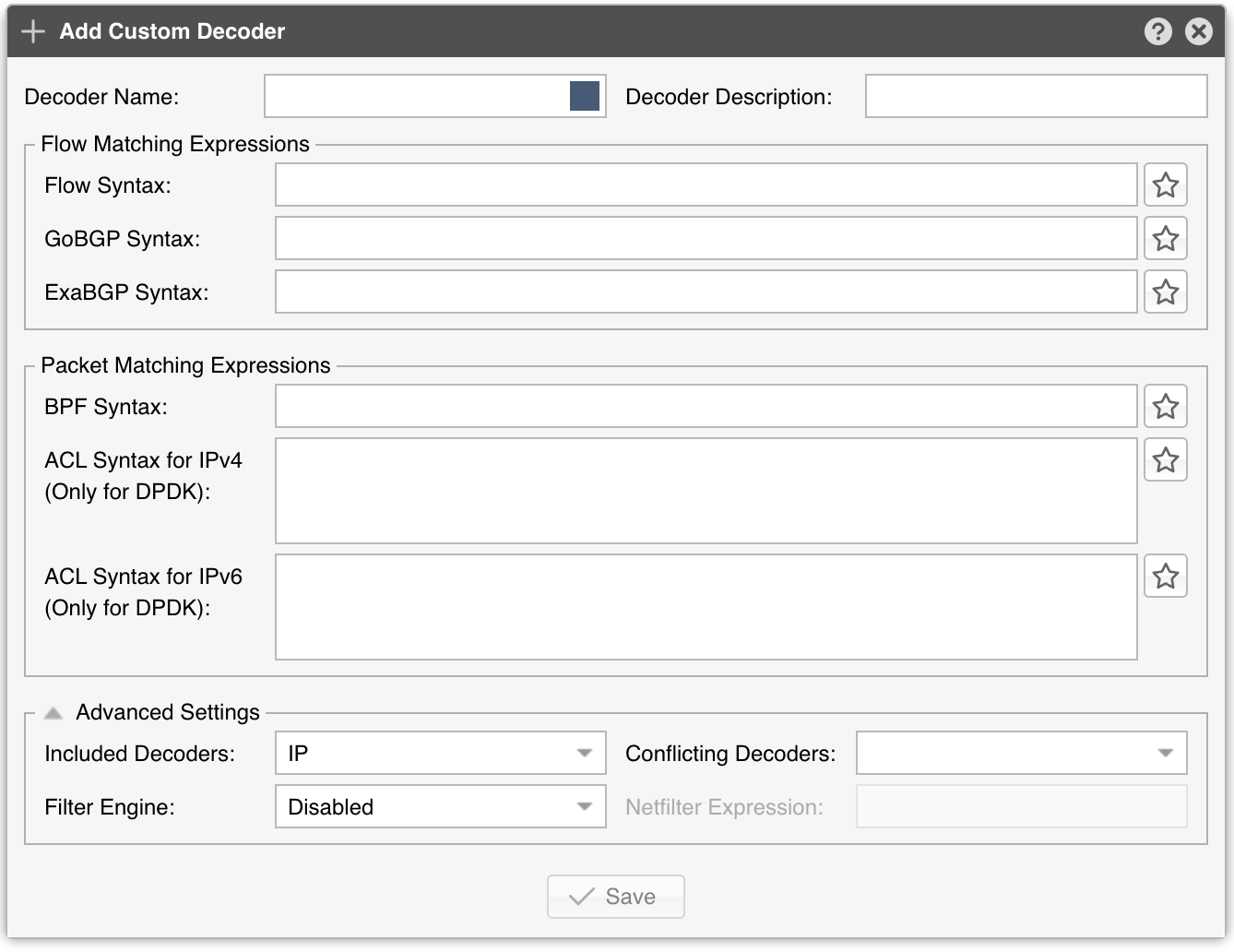
The Add Custom Decoder and Edit Custom Decoder windows group the parameters into three sections: Flow Matching Expressions, Packet Matching Expressions, and Advanced Settings. Each custom decoder is defined by the following parameters:
Every expression field has a star icon to its right, the Bookmarks & Syntax Help button. The window it opens combines a Syntax Help panel with a list of saved Bookmarks: select one and click [Insert Selection] — double-clicking works too — to copy it into the field, and use [Add], [Modify], and [Delete] to maintain your own expressions.
Note
To generate IP Graphs, Tops and Accounting data for a custom decoder, enable it in Configuration » General Settings » Graphs & Storage. To use the decoder for thresholds, enable it in Configuration » General Settings » Anomaly Detection. Sensors that use custom decoders are restarted when you save, and a Sensor fails to start when one of the decoder’s matching expressions is invalid, so check the event log after adding a decoder.
9.1. Built-in Decoders
IP |
Matches all IP packets, regardless of higher-layer protocols. Always enabled. |
IPV4 |
Matches all IPv4 packets, regardless of higher-layer protocols |
IPV6 |
Matches all IPv6 packets, regardless of higher-layer protocols |
TCP |
Matches TCP traffic |
TCP+SYN |
Matches TCP traffic with the SYN flag set and ACK unset. Flow Sensor counts one packet per flow |
UDP |
Matches UDP traffic |
ICMP |
Matches ICMP traffic (IP protocol 1) and ICMPv6 traffic (IP protocol 58) |
OTHER |
Matches IP protocols other than TCP, UDP, and ICMP |
INVALID |
Matches TCP or UDP port 0, or IP protocol 0 |
FLOWS |
Matches flow records and replaces packets/s with flows/s. Works only with Flow Sensor |
FLOW+SYN |
Matches flow records with the SYN flag set. Flow Sensor counts all packets per flow. Works only with Flow Sensor |
FRAGMENT |
Matches fragmented IP packets. Works only with Packet Sensor |
TCP-NULL |
Matches TCP traffic without TCP flags (indicative of reconnaissance sweeps) |
TCP+RST |
Matches TCP traffic with the RST flag set |
TCP+ACK |
Matches TCP traffic with the SYN flag unset and ACK set |
TCP+SYNACK |
Matches TCP traffic with both the SYN and ACK flags set |
NETBIOS |
Matches TCP traffic on source or destination port 139 |
QUIC |
Matches Google’s QUIC protocol on UDP ports 80 and 443 |
UDP-QUIC |
Matches UDP traffic that is not part of the QUIC protocol |
MEMCACHED |
Matches UDP traffic on port 11211 |
HTTP |
Matches TCP traffic on source or destination port 80 |
HTTPS |
Matches TCP traffic on source or destination port 443 |
Matches TCP traffic on source or destination ports 25, 110, 143, 465, 585, 587, 993, 995 |
|
DNS |
Matches TCP or UDP traffic on source or destination port 53 |
DNS-UDP |
Matches UDP traffic on source or destination port 53 |
SIP |
Matches TCP or UDP traffic on source or destination port 5060 |
IPSEC |
Matches IP traffic on IP protocols 50 or 51 |
WWW |
Matches TCP traffic on source or destination ports 80 or 443 |
SSH |
Matches TCP traffic on source or destination port 22 |
NTP |
Matches UDP traffic on source or destination port 123 |
SNMP |
Matches UDP traffic on source or destination ports 161 or 162 |
RDP |
Matches TCP or UDP traffic on source or destination port 3389 |
YOUTUBE |
Matches IP traffic to or from YouTube AS 43515, 36561, or YouTube subnets |
NETFLIX |
Matches IP traffic to or from Netflix AS 55095, 40027, 2906, 394406, or Netflix subnets |
HULU |
Matches IP traffic to or from Hulu AS 23286 or Hulu subnets |
Matches IP traffic to or from Facebook AS 54115, 32934, 63293, or Facebook subnets |
|
SSDP |
Matches Simple Service Discovery Protocol traffic on UDP port 1900 |
TCP+ALL |
Matches TCP traffic with all flags set (Xmas attack) |
TCP+FIN |
Matches TCP traffic with the FIN flag set |
TCP+RST+FIN |
Matches TCP traffic with the RST and FIN flags set |
TCP+ACK+PSH |
Matches TCP traffic with the ACK and PSH flags set |
TCP0 |
Matches TCP traffic on source or destination port 0 |
UDP0 |
Matches UDP traffic on source or destination port 0 |
LDAP |
Matches LDAP traffic on TCP port 389 |
CLDAP |
Matches Connectionless LDAP traffic on UDP port 389 |
CHARGEN |
Matches Character Generator Protocol traffic on port 19 |
SLP |
Matches Service Location Protocol traffic on port 427 |
GRE |
Matches Generic Routing Encapsulation traffic (IP protocol 47) |
ARMS |
Matches Apple Remote Management Service traffic on UDP port 3283 |
COAP |
Matches Constrained Application Protocol traffic on UDP port 5683 |
MSSQLRS |
Matches Microsoft SQL Server Resolution Service traffic on UDP port 1434 |
STUN |
Matches Session Traversal Utilities for NAT traffic on UDP port 3478 |
WSDD |
Matches Web Services Dynamic Discovery traffic on UDP port 3702 |
RIPV1 |
Matches Routing Information Protocol version 1 traffic on UDP port 520 |
MDNS |
Matches Multicast DNS traffic on UDP port 5353 |
RPCBIND |
Matches RPC Portmapper traffic on UDP port 111 |
NBNS |
Matches NetBIOS name and datagram traffic on UDP ports 137 and 138 |