29. General Settings » Outgoing Email
Every email the software sends — the reports of Schedulers » Event Reporting, the reports of Schedulers » Scheduled Reports, the reports sent from an Email Report window, and the emails sent by a Network & Policy » Response — is delivered with the settings from Configuration » General Settings » Outgoing Email.
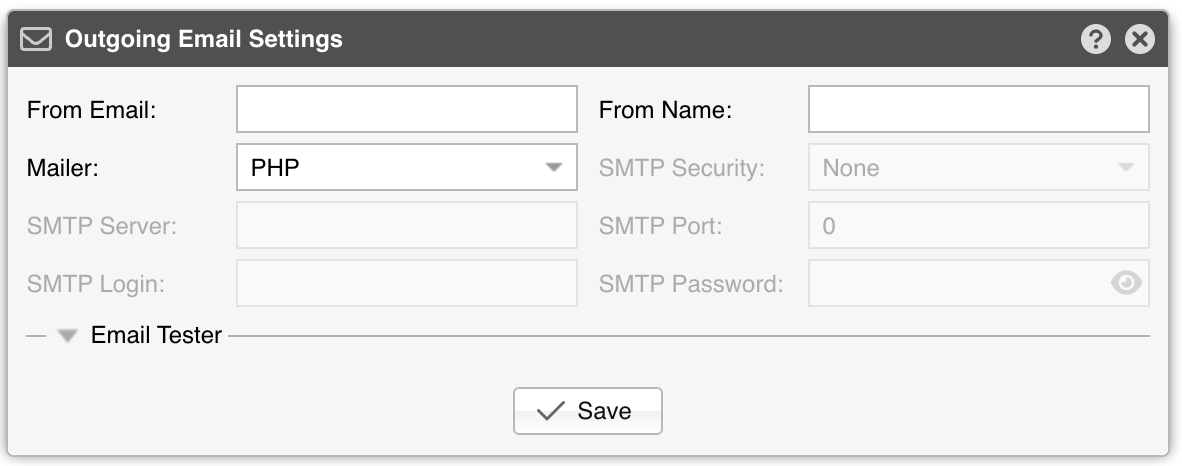
Outgoing Email Settings parameters:
● From Email – The email address appearing in the From field● From Name – The sender’s displayed name● Mailer – The backend that delivers the emails. The five SMTP parameters are grayed out unless this is set to SMTP:▪ None – Emails are not delivered. Every component that tries to send one reports Emailing is disabled by the Administrator▪ PHP – Uses the PHP mail() function. It needs an MTA (Postfix, Qmail, Sendmail) on the Console server, and a php.ini configured to use it▪ SMTP – Delivers straight to an SMTP server, bypassing any local MTA▪ Sendmail – Relies on the sendmail command, so it also needs an MTA on the Console server● SMTP Security – The encryption of the SMTP connection:▪ None – Connect in clear text. Unless the SMTP Server is localhost, the connection is still upgraded to TLS when the server announces support for STARTTLS▪ SSL – Encrypt the connection from the start▪ TLS – Connect in clear text, then upgrade the connection with STARTTLS● SMTP Server – The address of the SMTP server. List several of them separated by a semicolon (;) to have each one tried in turn until one accepts the email. An entry may carry its own port (mail.example.com:2525) and its own encryption (ssl://mail.example.com, tls://mail.example.com), which override SMTP Port and SMTP Security for that server alone. The certificate of the server is never validated, so self-signed certificates are accepted● SMTP Port – 25 for an unencrypted connection, 465 for SSL, 587 for TLS● SMTP Login and SMTP Password – The credentials of the SMTP server. They are used only when both of them are filled in; leave either one empty to connect without authenticating. The eye button reveals the password until the field loses focus
The collapsed Email Tester section sends a test email with the parameters currently entered in the window, whether they have been saved or not:
● Email To – A single email address, or several addresses separated by commas● Email Cc and Email Bcc – (Optional) The carbon-copy and blind carbon-copy recipients● The star button on the right of each field opens the Emails bookmarks, where frequently used addresses can be stored and recalled
[Send Test Email] sends a short message titled Test and reports the outcome underneath, together with the reason when the email could not be delivered. The attempt is abandoned after 15 seconds, while the emails the software sends on its own are given 60. Editing any of the parameters above clears the result, because it no longer describes what the window contains. The three recipients are not saved; they are used only by the test.