34. Reports » Tools » Routing
The Routing tab displays the BGP announcements (routing updates) sent by Wanguard and provides a way for Console users to send BGP announcements manually. Its three sub-tabs are listed along the bottom edge, and can be dragged into whatever order suits you.
34.1. Active BGP Announcements
Lists every BGP announcement that is still active, whether it was sent by a Console user, a Sensor or a Filter, and refreshes every 5 seconds. The top bar provides the following controls:
● Actions – Which buttons appear depends on how the BGP Connectors are configured. [Add Flowspec Rule] needs a Connector with Flowspec enabled; [Create Blackhole] needs a Connector without Flowspec that is either set up for S/RTBH or carries the Unset or Mitigation role; [Divert Traffic] needs a Connector with neither Flowspec nor S/RTBH, carrying the Unset or Diversion role. [Batch] holds three maintenance operations, each asking for confirmation:▪ Clear – Marks as finished the announcements that never reached their Connector, and withdraws the orphaned ones — those whose anomaly has ended although the announcement is still active. Announcements sent by hand are never withdrawn▪ Resend – Re-sends every active announcement to its BGP Connector, which is useful when ExaBGP has lost its configuration▪ Reset – Marks every active announcement as FINISHED without updating BGP, so the routers go on announcing the routes. Use it only when the announcements are already gone from the routers● Grouping – Group the announcements by BGP Connector or by Prefix. The name of the group is a link that withdraws every announcement inside it● Display – Compact omits the Flowspec rule of each announcement and the Pkts and Bits totals, and shows Comments only when an announcement carries one; Full shows them all● Refresh – Regenerate the listing every 5 seconds up to every 15 minutes, or only when you click the button
The Actions panel, the Actions column and the withdrawal links are hidden from a Guest user whose role does not grant BGP Operations Actions.
The New Flowspec Rule window:
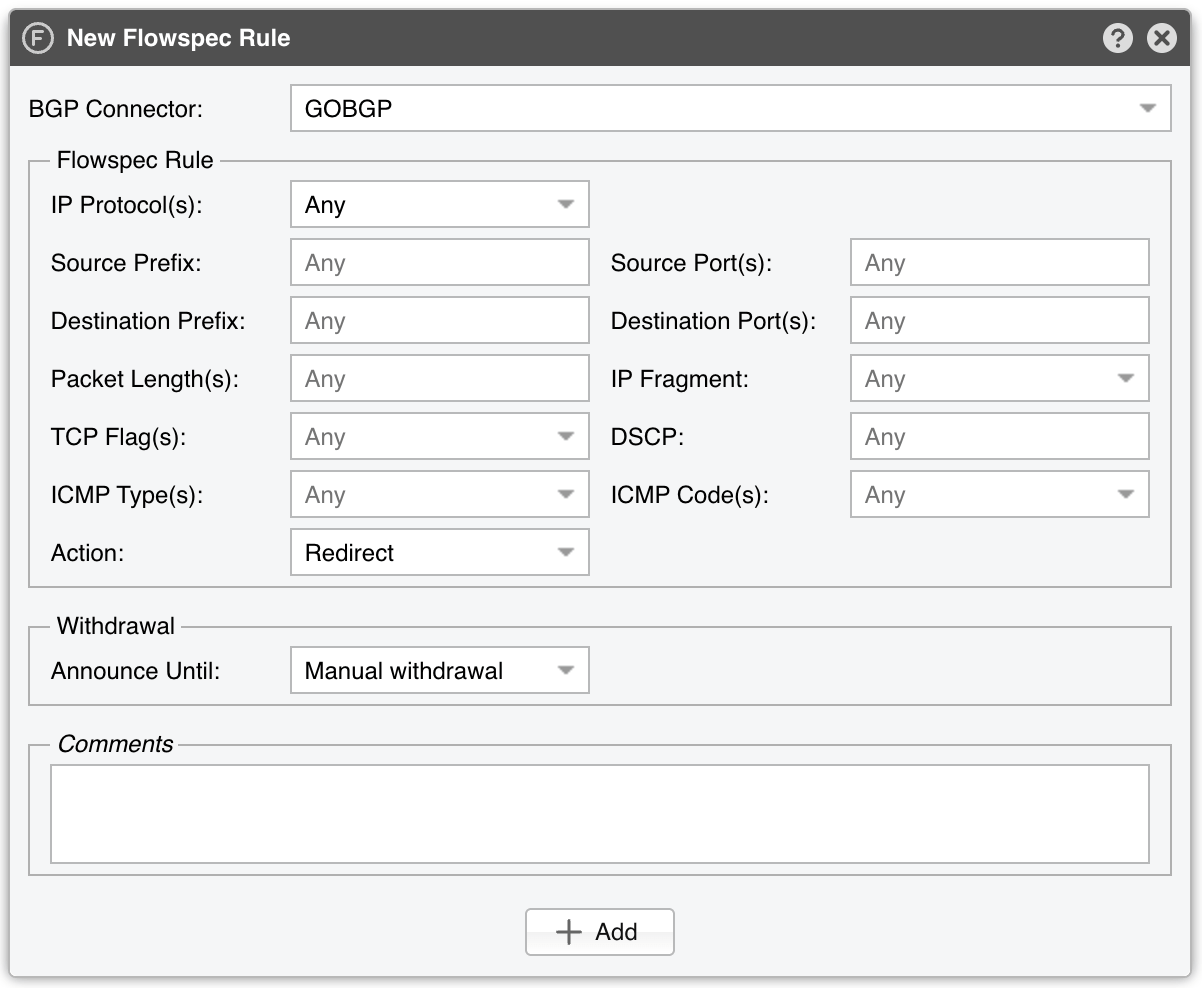
● BGP Connector – Select the Flowspec-enabled BGP Connector that will announce the rule● Flowspec Rule – Define the traffic matched by the rule using the fields IP Protocol(s), Source Prefix, Destination Prefix, Packet Length(s), TCP Flag(s), ICMP Type(s), Source Port(s), Destination Port(s), IP Fragment, DSCP, and ICMP Code(s). The two port fields are editable only while every selected IP protocol is Any, TCP, UDP, UDPLITE, DCCP or SCTP. Leaving both prefixes empty announces a rule that matches every source and every destination, and the Console asks you to confirm it● Action – Select what the routers should do with the matched traffic. BGP Connectors with the Mitigation role offer Discard, Rate Limit (limit set in the Rate Limit field), and Accept; BGP Connectors with the Diversion role offer Redirect, Redirect to IP (next-hop set in the Redirect IP field), Redirect to VRF (route target set in the Redirect VRF field), and Set Community (value set in the Community field); BGP Connectors with the Unset role offer all seven actions. The field belonging to the selected action appears beside it● Announce Until – Manual withdrawal keeps the rule active until you withdraw it; Custom interval withdraws it after the interval entered in the Custom Interval field; Custom date withdraws it on the date entered in the Custom Date field● Comments – Optional remarks about the announcement
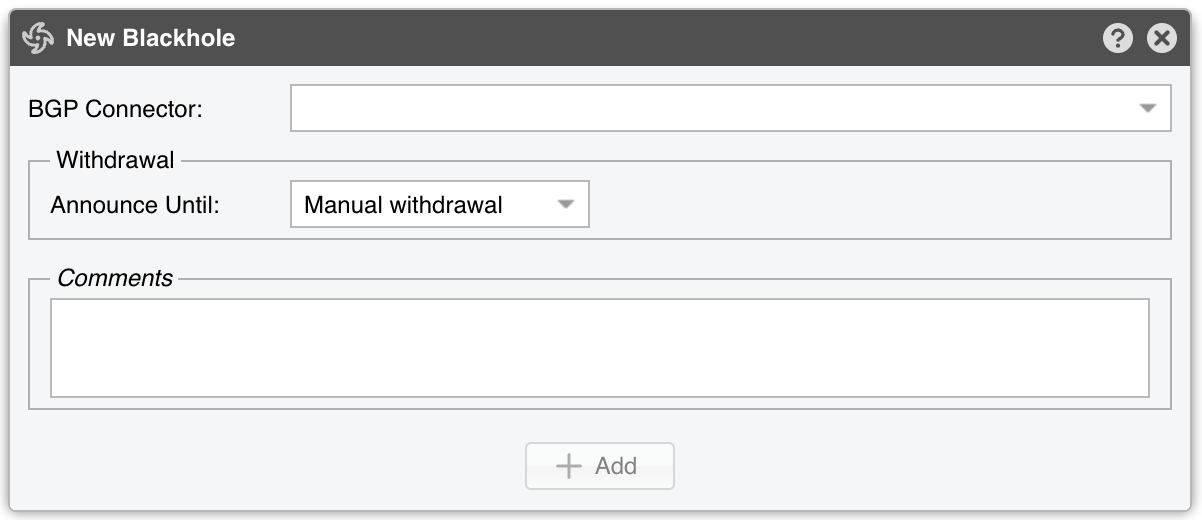
The New Blackhole and New Traffic Diversion windows hold the BGP Connector and a single prefix field, together with the Announce Until and Comments options described above. New Traffic Diversion asks for a Destination Prefix. So does New Blackhole, unless the selected Connector is set up for S/RTBH, in which case it asks for a Source Prefix instead:
When there is at least one active BGP announcement, the following table is displayed in the content area:
BGP Connector |
BGP Connector used for the routing update. When Grouping is set to BGP Connector, a single click withdraws all announcements that used it. |
Role |
Role configured for the BGP Connector. Can be Unset, Mitigation or Diversion. |
Prefix |
The prefix contained in the BGP routing update. When Grouping is set to Prefix, a single click withdraws all announcements for that prefix. |
Status |
A green check mark indicates that the announcement was sent successfully, while a red “X” icon indicates an error. Most errors are listed in the BGP Connector Events sub-tab. A loading icon indicates an announcement younger than 60 seconds that is still pending processing by the BGP Connector. A warning sign indicates that the anomaly that triggered the announcement is no longer active, but the announcement still is. In this case, you should remove the announcement manually and investigate the cause (e.g., check Console Events to see if a user expired the anomaly forcefully). |
Originator |
Indicates the username of the Console user that sent the announcement, or the anomaly — and the filtering rule, when there is one — for which the announcement was generated. To avoid overlapping announcements, only a single announcement is sent to the backend when there are multiple anomalies for the same prefix and BGP Connector. |
From |
Time when the BGP announcement was sent. |
Until |
Time when the BGP announcement will be withdrawn, or ∞ when only a manual withdrawal removes it. |
Flowspec |
Contains details about the BGP Flowspec rule. Visible only when Display is set to Full. |
Pkts/s (Peak) |
Visible when the Flowspec Counters feature is enabled in the configuration of at least one ExaBGP or GoBGP Connector. |
Bits/s (Peak) |
Visible under the same condition as Pkts/s (Peak). |
Pkts |
Total packets matched by the Flowspec rule. Visible under the same condition as Pkts/s (Peak), and only when Display is set to Full. |
Bits |
Total bits matched by the Flowspec rule. Visible under the same condition as Pkts/s (Peak), and only when Display is set to Full. |
Comments |
Contains user comments about the BGP announcement. Visible when any announcement carries a comment, or when Display is set to Full. |
Actions |
Holds [Withdraw announcement], which withdraws this announcement alone, and [Set Comment], which adds or edits its comment. The column is hidden for guest accounts without proper permissions. |
34.2. BGP Announcement Archive
A paged grid of every BGP announcement made by Sensors, Filters and Console users, 100 rows at a time. Click the down arrow on any column header to filter rows, change sorting direction, or show/hide columns.
● Row Filtering Expression – An SQL-style condition on the columns of the grid, applied when you press Enter. Write the column names as they appear in the header, in any case, and enclose the ones containing a space in double quotes:Status = 'ACTIVE' AND "BGP Connector" = 'core-router'. The Flowspec-counter columns — Pkts/s, Bits/s, Latest Pkts/s, Latest Bits/s, Packets and Bits — accept a K, M or G suffix, and From and Until accept a date, so"Bits/s" > '1G'selects the announcements that peaked above a gigabit. The star button opens the BGP Announcement Archive Filter bookmarks, where frequently used expressions can be stored and recalled● Display – How many columns the grid shows:▪ Compact – The default: №, Anomaly №, Filtering Rule, BGP Connector, S/RTBH, Role, Prefix, From, Until and Status▪ Extended – Adds Flowspec, Pkts/s, Bits/s and Comments▪ Full – Adds Backend, Flowspec Rule, Other Parameters, IP Address, Mask, Latest Pkts/s, Latest Bits/s, Packets, Bits, Originating User and Withdrawal User● Export – Print or export the grid● Refresh – Reload the grid on demand, or at a set interval
The Status column shows:
ACTIVE – Announcement successfully sent
FINISHED – Announcement successfully withdrawn
DELAYED – Announcement not withdrawn because another similar announcement remains active
UNKNOWN – Announcement not yet sent or an error occurred
Backend names the daemon that carried the announcement: Quagga, ExaBGP or GoBGP. Originating User indicates which Console user sent the announcement, while Withdrawal User indicates which Console user withdrew it.
Click a row to open the row editor, which can manually change the announcement’s Status, Comments, Role, Backend, Flowspec, and S/RTBH fields. The changes affect only the database, not the Quagga/FRR BGPd, ExaBGP or GoBGP configuration.