43. Appendix 1 – DPDK Configuration
43.1. Overview
The DPDK capture engine bypasses the Linux kernel networking stack and processes packets directly from the NIC, enabling line-rate traffic analysis and DDoS mitigation that would otherwise be impossible with a conventional socket-based driver.
If you are setting up DPDK on this host for the first time, work through the sections in order — each one builds on the previous.
43.2. System Requirements
Wanguard 9.0 is compatible with DPDK 25.11 running on Ubuntu 20 to 26, Debian 11 to 13, and Rocky / AlmaLinux / RHEL 9 or 10.
The data plane is optimized for the Broadwell microarchitecture and runs on every Intel microarchitecture from Sandy Bridge onward (Ivy Bridge, Haswell, Broadwell, Skylake, Cascade Lake, Ice Lake, Sapphire Rapids, …) as well as on AMD Zen processors.
Hardware checklist:
A multi-core CPU. For non-Mellanox NICs, its hardware virtualization extensions (VT-d / IOMMU) must be enabled in the BIOS.
At least 8 GB of RAM reserved as 1 GB hugepages (more on busy systems).
A DPDK-capable NIC. Mellanox / NVIDIA ConnectX cards work via the OFED driver; most Intel and Broadcom 10/25/40/100 GbE NICs work via the in-tree
vfio-pcidriver.
Consult the comparison table in Choosing a Method of DDoS Mitigation for the relationship between DPDK, PF_RING, and Libpcap, and for limitations specific to each.
43.3. DPDK Installation
Reserve at least 8 × 1 GB hugepages for best performance. The procedure differs slightly between Debian-derived and RHEL-derived distributions; both are shown below.
1. Install build dependencies:
[root@localhost ~]# apt install build-essential meson ninja-build libpcap-dev libnuma-dev python3-pyelftools
2. (Mellanox / NVIDIA only) Install the OFED driver before building DPDK:
[root@localhost ~/MLNX_OFED_LINUX]# ./mlnxofedinstall --add-kernel-support --dpdk
Use the OFED driver compatibility matrix to pick the version that matches your kernel.
3. Build the latest DPDK 25.11 stable release:
[root@localhost ~]# wget https://fast.dpdk.org/rel/dpdk-25.11.1.tar.xz
[root@localhost ~]# tar xf ./dpdk-25.11.1.tar.xz
[root@localhost ~]# cd dpdk-stable-25.11.1
[root@localhost ~/dpdk-stable-25.11.1]# meson setup build
[root@localhost ~/dpdk-stable-25.11.1]# ninja -C build
[root@localhost ~/dpdk-stable-25.11.1]# ninja -C build install
[root@localhost ~/dpdk-stable-25.11.1]# ldconfig
4. Reserve the 1 GB hugepages at boot. 1 GB (gigantic) pages must be reserved on the kernel command line — unlike 2 MB pages, they cannot be reliably allocated at runtime once memory is fragmented. Edit /etc/default/grub and append the following to GRUB_CMDLINE_LINUX_DEFAULT:
default_hugepagesz=1G hugepagesz=1G hugepages=8
Refresh GRUB and create the hugepages mount point:
[root@localhost ~]# update-grub
[root@localhost ~]# mkdir /mnt/huge
[root@localhost ~]# mount -t hugetlbfs -o pagesize=1G nodev /mnt/huge
Make the mount persistent by adding this line to /etc/fstab:
nodev /mnt/huge hugetlbfs pagesize=1G 0 0
5. Reboot and verify:
[root@localhost ~]# cat /proc/meminfo | grep Huge
[root@localhost ~]# ~/dpdk-stable-25.11.1/usertools/dpdk-hugepages.py --show
[root@localhost ~]# ~/dpdk-stable-25.11.1/usertools/dpdk-devbind.py --status
HugePages_Total should match what you set, and HugePages_Free should equal HugePages_Total until DPDK runs.
1. Install build dependencies:
[root@localhost ~]# dnf groupinstall "Development Tools"
[root@localhost ~]# yum install python3 meson ninja-build python3-pyelftools numactl-devel libpcap-devel grubby
2. (Mellanox / NVIDIA only) Install the OFED driver:
[root@localhost ~/MLNX_OFED_LINUX]# ./mlnxofedinstall --add-kernel-support --dpdk
3. Build DPDK 25.11:
[root@localhost ~]# wget https://fast.dpdk.org/rel/dpdk-25.11.1.tar.xz
[root@localhost ~]# tar xf ./dpdk-25.11.1.tar.xz
[root@localhost ~]# cd dpdk-stable-25.11.1
[root@localhost ~/dpdk-stable-25.11.1]# meson setup build
[root@localhost ~/dpdk-stable-25.11.1]# ninja -C build
[root@localhost ~/dpdk-stable-25.11.1]# ninja -C build install
[root@localhost ~/dpdk-stable-25.11.1]# ldconfig
4. Configure 1 GB hugepages and the mount point:
[root@localhost ~]# grubby --args="default_hugepagesz=1G hugepagesz=1G hugepages=8" --update-kernel=ALL
[root@localhost ~]# mkdir /mnt/huge
[root@localhost ~]# mount -t hugetlbfs -o pagesize=1G nodev /mnt/huge
Persist the mount by adding this line to /etc/fstab:
nodev /mnt/huge hugetlbfs pagesize=1G 0 0
5. Reboot and verify:
[root@localhost ~]# cat /proc/meminfo | grep Huge
[root@localhost ~]# ~/dpdk-stable-25.11.1/usertools/dpdk-hugepages.py --show
[root@localhost ~]# ~/dpdk-stable-25.11.1/usertools/dpdk-devbind.py --status
43.4. Binding NICs to a DPDK-Compatible Driver
Mellanox and NVIDIA ConnectX cards do not require unbinding from the kernel — they are managed by the OFED driver and DPDK takes them over transparently. For every other NIC family (Intel, Broadcom, etc.), the device must be detached from its kernel driver and bound to vfio-pci:
[root@localhost ~]# modprobe vfio-pci
[root@localhost ~]# ~/dpdk-stable-25.11.1/usertools/dpdk-devbind.py --status
[root@localhost ~]# ~/dpdk-stable-25.11.1/usertools/dpdk-devbind.py -b vfio-pci <pci_id>
Replace <pci_id> with the value shown in the first column of --status (for example 0000:01:00.0). To bind multiple ports, list them separated by spaces.
Note
vfio-pci requires IOMMU (Intel VT-d or AMD-Vi) to be enabled in the BIOS and on the kernel command line. If binding fails with “VFIO not enabled in the kernel”, add intel_iommu=on iommu=pt (Intel) or amd_iommu=on iommu=pt (AMD) to GRUB_CMDLINE_LINUX_DEFAULT and re-run update-grub / grubby.
Confirm DPDK can drive the bound interfaces with the bundled test application:
[root@localhost ~]# dpdk-testpmd -l 0-7 -- -i
testpmd> show port info all
Each bound port should appear with a status line and link information. Press Ctrl-D to exit.
43.5. Application Workflow
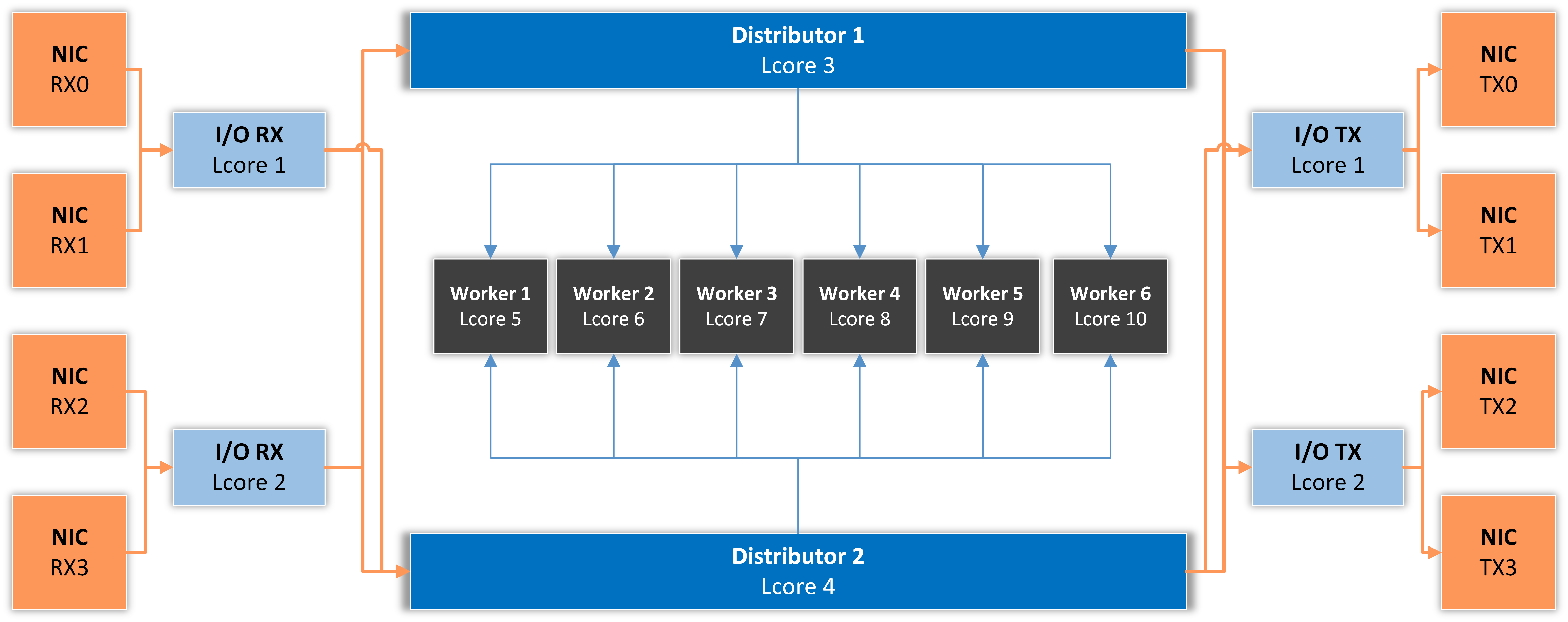
The data-plane pipeline is split into specialized lcores (logical CPUs). Each role is a separate thread pinned to a single lcore, communicating with its peers via lock-free DPDK rings. The diagram below shows a typical configuration with 2 I/O RX, 2 I/O TX, 2 Distributor, and 6 Worker lcores spanning 4 NIC ports:
- I/O RX Lcore
Reads packet bursts from one or more NIC RX queues and dispatches them to one or more Distributor lcores. Pinning RX queues to dedicated lcores avoids kernel interrupts and yields a stable per-port receive rate.
- Distributor Lcore
Reads packets from one or more I/O RX lcores, parses Layer 3 / Layer 4 metadata, then forwards either packets to TX or compact metadata records to the workers.
On Packet Filters, the Distributor stage also enforces the Dataplane firewall rules (
rte_acl+rte_flow-offloaded drops) before forwarding.- Worker Lcore
Performs traffic analysis, attack detection, and IP-zone counter updates. Workers do not touch packets directly — they consume metadata from the distributors. CPU-intensive work (top-N tables, anomaly counters, hash lookups) lives here.
- I/O TX Lcore
Drains the egress rings and writes packet bursts onto the NIC TX queues. Required only when forwarding is enabled.
- Master Lcore
Reserved for the control plane: it aggregates per-worker counters, drives MariaDB reporting, polls the configuration queue for hot-reload commands (ACL changes, GRE tunnel reloads, IP-zone rebuilds), and orchestrates the lifecycle of the other lcores.
Note
For best performance, all lcores in the same pipeline should sit on the same NUMA node as the NIC’s PCIe slot. Cross-socket traffic (DMA from a NIC on socket 0 to a worker on socket 1) costs roughly 2–3× more memory bandwidth and shows up as worker-side latency. Use lstopo to confirm NIC ↔ socket affinity, and pick lcores accordingly.
43.6. DPDK Capture Engine Options
These options are configured per Packet Sensor or Packet Filter instance in the DPDK Options dialog, which opens after clicking the button on the right of the Capture Engine field in the component’s configuration window. The dialog groups the options into collapsible field sets — Generic Parameters, Interface Parameters, and Advanced Parameters, plus GRE Tunnel Parameters and GRE Tunnel Routes when Forwarding Mode is IP Forwarding (both described in GRE Tunnel Encapsulation below).
- DPDK Driver
Select NVIDIA MLX5 (Mellanox ConnectX / NVIDIA BlueField) when using a Mellanox / NVIDIA NIC; otherwise keep the default, Generic. The switch selects which data-plane build is launched: the MLX5 build is linked against the OFED libraries and drives the ports through the NVIDIA MLX5 poll-mode driver, so it requires the OFED driver to be installed.
- EAL Options
Mandatory. Command-line arguments passed to the DPDK Environment Abstraction Layer at startup. At minimum specify
-l(the lcore set) and-n(memory channels). Consult the DPDK Getting Started Guide or the Configuration Example below.
The Generic Parameters field set defines the pipeline layout:
- Distributor Mode
Algorithm used to route packets from the NIC RX queues to the Distributor lcores:
- Direct Mode (RSS, RX/TX by Distributors)
The Distributor lcores read packets straight from the NIC RX queues, eliminating the I/O RX stage and its software rings; the NIC spreads flows across the queues with RSS, preserving per-flow ordering. When a Forwarding Mode is enabled, each Distributor lcore also transmits on its own NIC TX queue, so the I/O TX stage disappears as well. The freed I/O lcores can be reassigned as additional Distributor or Worker lcores; the Worker stage is unchanged. Configure as many RX queues per port as there are Distributor lcores — queue q of every port is served by the q-th Distributor lcore — and place the Distributor lcores on the same NUMA node as the NIC. RX Parameters take the form
(PORT,QUEUE)and TX Parameters the form(PORT)(no lcore fields, since there are no I/O lcores to name). Like RSS, Direct Mode does not spread traffic dominated by a single flow across lcores, so prefer Round Robin for passive sniffing of such traffic.- Receive Side Scaling (RSS)
All packets with the same RSS hash land on the same Distributor lcore. Use for any forwarding deployment — preserves per-flow ordering, which TCP requires.
- Round Robin
Evenly shares load across Distributor lcores. Use when packets are not forwarded (sensor-only deployments) or when packet ordering does not matter.
- Custom
Manually pin each (port, queue) to a specific Distributor lcore via the extended RX syntax. Use when you have an asymmetric traffic profile and want fine-grained control.
- Distributor Lcores
Mandatory. Comma-separated list of lcores running the Distributor thread(s). Each Distributor lcore receives packets from one or more I/O RX lcores and feeds one or more Worker lcores.
- RX Parameters
Mandatory. Specifies which NIC RX queues are read by which I/O RX lcores. The set of lcores listed here implicitly defines the I/O RX lcore set.
Default syntax:
(PORT,QUEUE,LCORE)..Example:
(0,0,15)(0,1,16)(1,0,15)(1,1,16)— ports 0 and 1, two queues each, served by lcores 15 and 16.If Distributor Mode is set to Custom, the syntax extends to
(PORT,QUEUE,LCORE,DISTRIBUTOR_LCORE).., allowing per-(port,queue) routing to a specific Distributor lcore.If Distributor Mode is set to Direct Mode, there are no I/O RX lcores — the Distributor lcores read the queues themselves — so the LCORE field is omitted:
(PORT,QUEUE)...- Worker Lcores
Mandatory. Comma-separated list of lcores running the per-worker analysis loop. The number of workers should be tuned to the expected packet rate and the cost of the enabled analysis features (see Sizing the Lcore Plan).
- Master Lcore
Mandatory. Single lcore reserved for control-plane work. The master lcore does not need to be a high-performance core — the hyper-thread sibling of the core left to the OS is a good choice.
- Forwarding Mode
Specifies what the DPDK engine does with packets after classification.
The mode is independent of whether the instance is a Packet Sensor or a Packet Filter — both can use any of the modes.
- Disabled
No packet forwarding. The engine receives, classifies, and reports; it never transmits.
Use for passive monitoring or for out-of-band mitigation where attack traffic is dropped upstream via BGP (RTBH, Flowspec, etc.) rather than by this box.
- IP Forwarding
Full L3 forwarding. The engine:
answers ARP / NDP requests for the per-port interface IP,
replies to ICMP echo (IPv4) and ICMPv6 echo (IPv6) directed at the interface IP,
rewrites the source MAC of forwarded packets with the egress port’s own MAC,
rewrites the destination MAC with either a configured static MAC or the result of ARP / NDP resolution against a configured gateway IP,
does not decrement the IP TTL and does not run the full set of RFC 1812 router checks,
supports per-prefix encapsulation into GRE tunnels (see GRE Tunnel Encapsulation below), with optional ICMP Frag Needed / ICMPv6 Packet Too Big responses for oversized packets.
Use IP Forwarding when the device is deployed out-of-line and traffic is redirected to it via BGP — it acts as a pseudo-router for the protected prefix and either forwards or drops based on the configured rules.
- Transparent Bridge
Ethernet frames are either dropped (if a rule matches) or forwarded unchanged out the partner port. The fastest inline software mode — no header rewrite, no L3 lookups. The partner can be a VLAN sub-interface of the same physical port (see Forwarding Table); the 802.1Q VLAN ID is then the only header field rewritten.
- Hardware Bridge
Available only on NICs with hairpin support (Mellanox / NVIDIA mlx5). The NIC forwards Ethernet frames between the two bridged ports entirely in silicon, at line rate, without the traffic crossing PCIe to the CPU — the lowest-latency, lowest-CPU forwarding mode. The ports are paired through the Forwarding Table; Interface IPs and Interface Gateways are not used, because forwarding is transparent at Layer 2. A single port can also bridge between two of its VLAN sub-interfaces (see Forwarding Table): the NIC hairpins the port to itself and rewrites the VLAN ID on egress.
A configurable share of the traffic (1-in-N, controlled by the Packet Sampling (1/N) parameter) is mirrored to software, so the Sensor/Filter can still account for and analyze the traffic and detect anomalies. Any Dataplane firewall rules are offloaded to the NIC and take precedence over the bridge, so mitigation drops also execute in hardware; the range of firewall rules that can be enforced is limited to what the NIC’s flow engine supports.
- TX Parameters
Displayed and mandatory when Forwarding Mode is not Disabled. Specifies which lcores handle TX and which NIC TX ports they drain.
Syntax:
(PORT,LCORE)..Example:
(0,3)(1,17)— TX for port 0 runs on lcore 3, TX for port 1 runs on lcore 17.A bare
(PORT)..declares a TX port with no I/O TX lcore. Use this form for Hardware Bridge, where the NIC transmits in silicon and no TX core is needed, and in Direct Mode, where each Distributor lcore transmits on its own queue. The(PORT,LCORE)form is required for software forwarding (Transparent Bridge, IP Forwarding) in the default Distributor Modes; in Direct Mode it is rejected.A single-port deployment (both legs on VLAN sub-interfaces of one port) names just that port —
(0,3)or(0)— and the one I/O TX lcore then transmits both legs.- Forwarding Table
Displayed when Forwarding Mode is not Disabled. Determines the egress port given an ingress port. Read at startup; not dynamically updated.
Syntax:
(PORT_IN,PORT_OUT)..or(PORT_IN.VID_IN,PORT_OUT.VID_OUT)..Example:
(0,1)(1,0)— symmetric two-port pipe.Example:
(0.10,0.20)(0.20,0.10)— single-port pipe: the two legs of the inline path are VLAN 10 and VLAN 20 of port 0.The
PORT.VIDform names an 802.1Q VLAN sub-interface. It lets one physical port carry both legs of an inline deployment — the upstream switch trunks two VLANs to the same port — and can also translate VLAN IDs between two ports. A frame that arrives onPORT_INtagged withVID_INleaves onPORT_OUTtagged withVID_OUT; the 802.1p priority bits are preserved. The rules:Available with Transparent Bridge and Hardware Bridge. IP Forwarding keeps one Interface IP and one gateway per physical port and rejects
PORT.VIDentries.A port is either a physical-port entry or a set of VLAN sub-interface entries —
(0,1)cannot be combined with(0.10,0.20). Both sides of one entry use the same form.On a port with VLAN sub-interface entries, frames that are untagged, that carry an 802.1ad (0x88A8) outer tag, or whose VLAN ID has no entry are still analyzed and accounted for, but never forwarded. The engine logs them, per second, as dropped with no (port, VID) Forwarding Table entry.
With Hardware Bridge, all VLAN sub-interfaces of a port must egress on the same port (the NIC hairpins a port to exactly one peer), and one ingress VLAN ID cannot be rewritten to two different IDs on the same egress port. The NIC rewrites the VLAN ID on the egress side, so the sampled copies delivered to software carry the original tag.
Valid VLAN IDs are 1 to 4094, on ports 0 to 14.
In Dataplane firewall rules, the input field identifies a VLAN sub-interface as
4096 × (PORT + 1) + VID—4106for0.10,4116for0.20— so a rule can be scoped to one leg of a single-port bridge. Physical ports keep their port number as the input value. The engine prints each entry with its input index at startup.Note
With a single port, both legs share that port’s line rate and its RX queues: each direction gets at most half the bandwidth, and an inbound flood competes with the outbound leg for RX capacity before the CPU is a factor. Size the port for the sum of both directions plus attack headroom. Hardware Bridge keeps the forwarding off the CPU entirely; for the software Transparent Bridge, prefer Direct Mode, which gives every Distributor lcore its own TX queue instead of draining the port from one I/O TX lcore.
- Interface IPs
Displayed and mandatory only when Forwarding Mode is IP Forwarding. Assigns each port a Layer-3 identity. The application uses these addresses to:
answer ARP (IPv4) and NDP (IPv6) requests on that port,
respond to ICMP echo / ICMPv6 echo,
source any packets it generates itself (gratuitous ARPs, ICMP errors, GRE tunnel outer headers).
Both IPv4 and IPv6 are accepted; the format is auto-detected. To dual-stack a port, list it twice.
Syntax:
(PORT,IP)..Examples:
(0,192.168.1.1)(1,192.168.0.1)— IPv4 only, two ports(0,192.168.1.1)(0,2001:db8::1)(1,192.168.0.1)(1,2001:db8:1::1)— dual-stack on both ports
- Interface Gateways
Displayed only when Forwarding Mode is IP Forwarding. Specifies how the application reaches the next hop on each port. Each entry can be either a static MAC or a gateway IP — the format is auto-detected.
Syntax:
(PORT,MAC_OR_IP)..- Static MAC form
(0,00:07:52:12:25:f1)The application writes that MAC into every forwarded packet’s Layer-2 destination field. Fast, deterministic, no probing — but goes wrong silently if the next hop changes.- Gateway IP form
(0,10.0.0.254)for IPv4, or(0,fe80::1)for IPv6 The application probes the gateway with ARP (IPv4) or NDP (IPv6) once per second per port until it gets a reply, then caches the learned MAC. While resolution is pending, packets on that port are dropped. The gateway MAC is also re-learned automatically from any unsolicited ARP / gratuitous-ARP traffic seen from the configured gateway IP, so HA failovers converge within a fraction of a second.
Use the static-MAC form in labs and back-to-back deployments. Use the gateway-IP form in production when plugged into real routers.
The Interface Parameters field set (collapsed by default) groups the Interface Type, GRE Decapsulation, VXLAN Decapsulation, and Packet Sampling (1/N) options; only the ones applicable to the component type are shown. They work exactly as described for the other capture engines in the Packet Sensor and Packet Filter configuration chapters.
The Advanced Parameters field set (collapsed by default) contains:
- Max. Filter Instances
Displayed only for Packet Filters. Caps how many Filter instances may run concurrently on the DPDK engine; when the cap is reached, additional instances are not started and an event is logged. Leave empty for Unlimited.
- Max. Frame Size
Maximum L2 frame size. Set to the jumbo-frame size in use (typically
9000for 9k jumbos). Default1518for standard Ethernet.- Max. Memzone
By default, DPDK allows up to 2560 memzones. The only side effect of raising the limit is a slightly longer DPDK startup.
The default can be exhausted when many Packet Sensor/Filter instances are active simultaneously — raise this value when more than ~120 concurrent anomalies are expected.
- IP Hash Table Size
Number of entries in the per-direction IP hash table. Default
1,048,576for each of IPv4 and IPv6. Increase only if monitoring shows the hash hit-rate dropping.- Int. IP Mempool Size
Displayed only for Packet Sensors. Number of internal-IP records pre-allocated and split equally across the worker lcores. Default
1,048,576. Sized for up to one million internal IPs that exchange traffic within 1–5 seconds. RAM usage per IP record is reported under Sensor Graphs » IP Structure RAM.- Ext. IP Mempool Size
Same idea, but for external IPs (records of remote peers). Default
1,048,576, also split among workers.- Ring Sizes
Size of each ring along the pipeline.
Syntax:
A, B, C, DField
Meaning
A
Number of descriptors in the NIC RX ring
B
Number of elements in the Distributor inbound software rings (I/O RX → Distributor)
C
Number of elements in the Distributor outbound software rings (Distributor → Worker / I/O TX)
D
Number of descriptors in the NIC TX ring
Default
1024, 1024, 1024, 1024. Optimal for the Intelixgbedriver; Mellanox and Broadcom NICs occasionally benefit from doubling the NIC-side rings.- Burst Sizes
Number of packets processed in each ring read or write.
Syntax:
(A, B), (C, D), (E, F)Field
Meaning
A
I/O RX read burst from NIC RX
B
I/O RX write burst to software rings
C
Distributor read burst from software rings
D
Distributor write burst to software rings
E
I/O TX read burst from software rings
F
I/O TX write burst to NIC TX
Default
(144,144),(144,144),(144,144). Smaller bursts give lower latency; larger bursts give higher throughput.
43.7. Sizing the Lcore Plan
The right lcore distribution depends on traffic profile, feature mix, and CPU model. As a starting point:
Role |
Heuristic |
|---|---|
Master |
One lcore. The hyper-thread of the OS-attached core is fine. |
I/O RX |
One per NIC port at 10 GbE. One per queue at 25/40/100 GbE. Use NIC RSS to spread across queues. |
Distributor |
One per I/O RX lcore is a reasonable starting point. With heavy ACL / GRE encap, use one per pair of I/O RX lcores. |
Worker |
The remainder. Allocate roughly |
I/O TX |
One per egress port for ≤ 25 GbE; one per queue for 40/100 GbE. Skip when Forwarding Mode is Disabled. |
Always leave at least one physical core free for the OS — running every lcore at 100 % utilization can starve the kernel scheduler of CPU time, leading to MariaDB / SSH lag and even kernel watchdogs. Its hyper-thread sibling should stay idle or carry only the Master Lcore. Keep the OS cores out of the EAL -l set; optionally, isolate the DPDK lcores from the kernel scheduler by listing them in isolcpus= on the kernel command line.
43.8. DPDK Configuration Example
The example below assumes a 14-core Xeon CPU (Broadwell-EP class) with Hyper-Threading enabled. The usertools/cpu_layout.py output is:
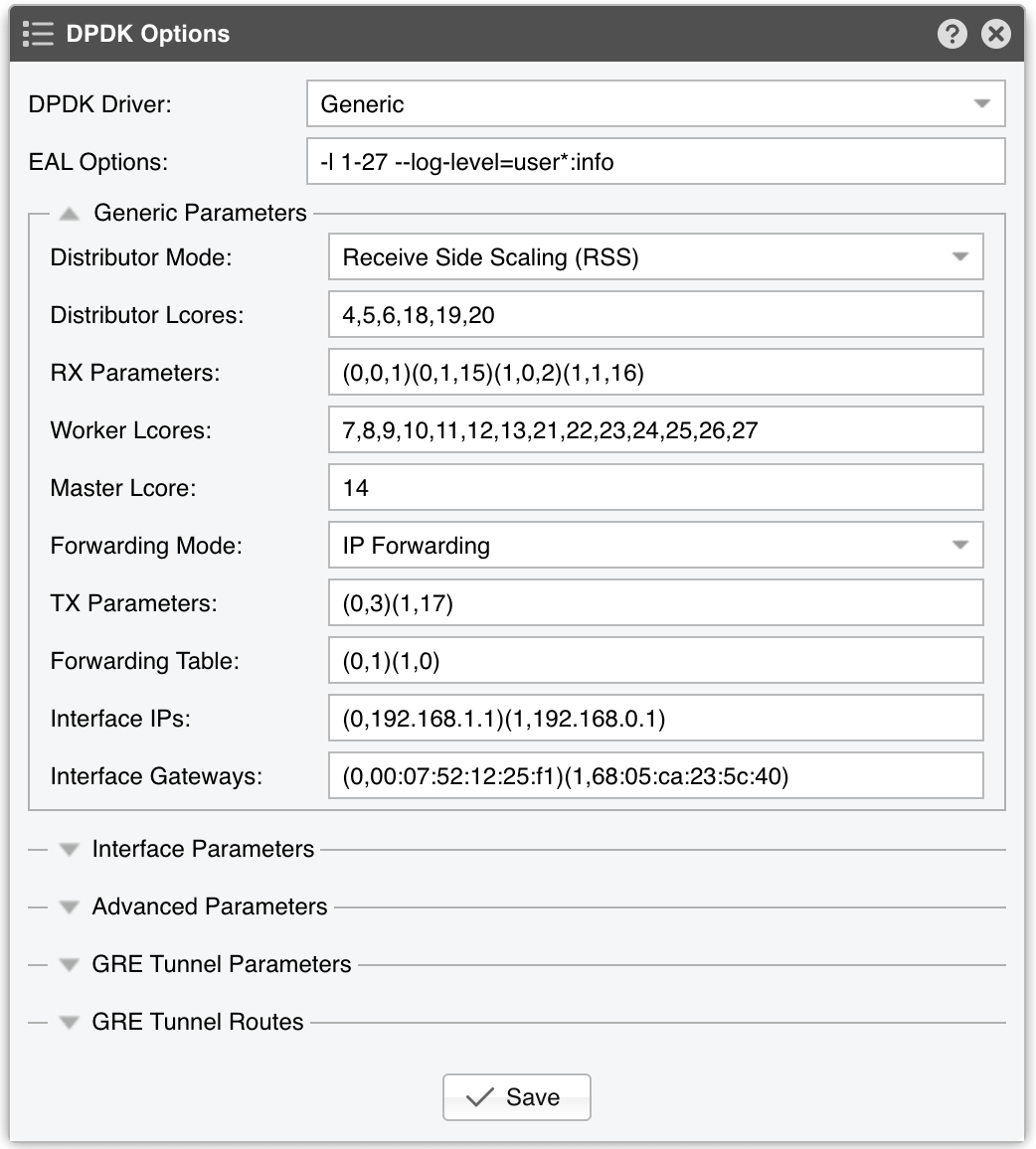
EAL Options -l 1-27 -n 4 --log-level=user*:info --syslog
-l 1-27— DPDK uses lcores 1–27, i.e. 27 of the machine’s 28 logical CPUs, leaving lcore 0 to the OS.-n 4— Four memory channels, matching this Broadwell platform’s IMC layout.--log-level=user*:info --syslog— DPDK engine activity is logged at info level via syslog.
RX Parameters (0,0,15)(0,1,16)(1,0,15)(1,1,16)
Ports 0 and 1 with two queues each, served by lcores 15 and 16 (the hyper-thread siblings of lcores 1 and 2).
Distributor Mode Receive Side Scaling
Ensures per-flow ordering is preserved end to end — required for TCP forwarding and recommended for any IP-Forwarding deployment.
Distributor Lcores 18, 19, 20
Three lcores (the hyper-thread siblings of lcores 4, 5, and 6). The distributor stage runs the data-plane firewall and dispatches metadata to the workers.
Worker Lcores 7-13, 21-27
Seven physical cores plus their hyper-thread siblings — fourteen lcores total — handle traffic analysis and attack detection.
Master Lcore 14
The hyper-thread sibling of lcore 0, which stays with the OS; reserved for the control plane and MariaDB reporting.
TX Parameters (0,3)(1,17)
Lcore 3 transmits on port 0, and lcore 17 (its hyper-thread sibling) transmits on port 1.
Forwarding Mode IP Forwarding
The DPDK Engine acts as an L3 pseudo-router for an out-of-line BGP redirect topology.
Forwarding Table (0,1)(1,0)
Symmetric two-port pipe: traffic incoming on port 0 leaves on port 1 and vice versa. With a single port trunked to two VLANs, use
(0.10,0.20)(0.20,0.10)together with Transparent Bridge or Hardware Bridge — IP Forwarding does not support VLAN sub-interfaces.
Interface IPs (0,192.168.1.1)(1,192.168.0.1)
The DPDK Engine answers ARP for
192.168.1.1on port 0 and192.168.0.1on port 1. Once upstream routers learn these MACs, they can forward traffic to the appropriate port.
Interface Gateways (0,00:07:52:12:25:f1)(1,68:05:ca:23:5c:40)
Static-MAC form: every packet leaving port 0 is addressed to
00:07:52:12:25:f1at L2; every packet leaving port 1 to68:05:ca:23:5c:40. To switch to dynamic ARP-driven resolution, replace each MAC with the next-hop IP — for example(0,192.168.1.254)(1,192.168.0.254).
Note
The optimal lcore distribution can be refined by observing the Dataplane statistics on Reports » Devices » Overview » Dataplane. A Workers Deq. percentage below 100 % indicates the worker count needs to grow; a rising RX Dropped counter or an RX Enq. percentage below 100 % indicates the I/O RX or Distributor stage is the bottleneck.
43.9. GRE Tunnel Encapsulation
When Forwarding Mode is set to IP Forwarding, the data plane can additionally encapsulate per-prefix traffic into GRE tunnels and deliver it to one or more remote endpoints. This is the mechanism a Packet Filter uses to ship cleaned (post-scrubbing) traffic back to a customer’s GRE-terminating device after attracting the prefix via BGP — but the same primitive can also be used to relay traffic to a downstream scrubbing tier.
43.9.1. Feature summary
Capability |
Notes |
|---|---|
RFC 2784 / RFC 2890 GRE encap |
Optional 32-bit Tunnel Key per instance |
IPv4 and IPv6 inner traffic |
Outer wrapper is always IPv4 |
Multi-endpoint HA per tunnel |
Up to 4 endpoints per prefix; ECMP’d via inner-flow RSS hash |
Cisco-style keepalive |
Per-endpoint liveness; dead endpoints are excluded from ECMP |
MTU enforcement |
ICMP Frag Needed (IPv4 / DF=1) or ICMPv6 Packet Too Big (IPv6) back to the original sender |
IPv4 pre-fragmentation (DF=0) |
Outer-fragmented; up to 16 fragments per packet |
TCP TSO over GRE |
NIC slices large DF=0 TCP into per-segment GRE encaps when both |
Outer IPv4 checksum offload |
NIC computes the outer cksum when the port advertises |
DSCP / TC preservation |
Per-tunnel: copy from inner header or pin to a fixed value |
Configurable outer TTL |
Default 64; range 1–255 |
Hot reload |
MariaDB-driven; atomic active/standby pointer swap with no traffic loss |
Loop-prevention guard |
Refuses to load if any endpoint IP is itself inside a tunneled prefix |
43.9.2. Prerequisites
Forwarding Mode must be IP Forwarding. The feature stays disabled in Disabled and Transparent Bridge modes — GRE encap is a Layer-3 forwarding action, so it has no meaning in passive or pure-bridge deployments.
Each forwarding port must have a valid Interface IPs entry — the data plane uses it as the outer source IP for every GRE wrapper it builds and every keepalive probe it emits.
The egress port’s gateway MAC must be resolvable (static or via ARP / NDP). Until that resolution completes, GRE-encapped packets are dropped along with the rest of the egress traffic.
43.9.3. Tunnel configuration
GRE tunnels are configured from two field sets of the DPDK Options dialog, both visible only when Forwarding Mode is IP Forwarding:
GRE Tunnel Routes — a grid mapping each protected prefix to one or more tunnel-peer endpoints, and
GRE Tunnel Parameters — the settings that apply to every tunnel of this instance (key, MTU, TTL, keepalive, ToS).
GRE Tunnel Routes — prefixes and endpoints
Manage the routes with the [Add Route], [Edit Route], and [Delete Route] buttons; double-click a row to edit it in place, and drag rows to re-order them. Each route pairs a single prefix with a single tunnel-peer IP:
Column |
Description |
|---|---|
Prefix |
IPv4 or IPv6 CIDR — for example |
Tunnel Endpoint |
The remote tunnel-peer IP (must be IPv4) — for example |
To create an HA tunnel with multiple endpoints, add several routes with the same prefix and different endpoint IPs. Up to 4 endpoints per prefix (extras are ignored, with a log line). Up to 1024 distinct prefixes per instance.
GRE Tunnel Parameters — one set per instance
These settings apply to every tunnel of this instance:
Field |
Description |
Default |
|---|---|---|
Tunnel Key |
32-bit RFC 2890 key tagging every packet on every tunnel of this instance. Useful when the peer needs to disambiguate multiple tunnels from the same source IP. Leave empty to disable. |
no key |
Tunnel MTU |
Outer-link MTU in bytes (Ethernet frame minus L2 header). |
|
Tunnel TTL |
Outer IPv4 TTL, between 1 and 255; out-of-range values fall back to the default. |
|
Keepalive |
Disabled or Enabled. |
Disabled |
Keepalive Interval (ms) |
Displayed when Keepalive is Enabled. Per-endpoint probe interval in milliseconds, between 1 and 65,535. An endpoint is flagged dead after 3 consecutive misses. |
|
TOS Mode |
Copy from inner packet copies the inner DSCP/TC byte onto the outer wrapper; Pin to specific value overrides it with TOS Pin. |
Copy from inner packet |
TOS Pin |
Outer ToS / Traffic Class byte, displayed when TOS Mode is Pin to specific value. |
|
There is currently no per-prefix override — distinct settings require separate instances.
43.9.4. Applying changes
Saving the DPDK Options dialog signals the running data plane to reload. The master lcore picks up the signal on its next tick, rebuilds the tunnel state into a standby buffer, atomically publishes it, drains all distributor lcores past the old state, then frees the previous buffer. The swap is hitless — in-flight bursts complete on the old state and the next burst loads the new one.
If the new configuration is empty (all entries removed), the feature is cleanly disabled and stays so until a non-empty configuration is saved.
43.9.5. Configuration example
A typical “two scrubbers, ECMP’d, with keepalive enabled, jumbo-friendly” setup:
Open the DPDK Options dialog of the Packet Filter instance and expand the GRE Tunnel Parameters field set:
Tunnel Key =
1234567Tunnel MTU =
9000Tunnel TTL =
64Keepalive = Enabled
Keepalive Interval (ms) =
5000TOS Mode = Copy from inner packet
Expand the GRE Tunnel Routes field set and add three routes:
203.0.113.0/24→198.51.100.10(first ECMP endpoint)
203.0.113.0/24→198.51.100.11(second ECMP endpoint, same prefix)
2001:db8::/32→198.51.100.20(IPv6 prefix going to a single endpoint)
Save the configuration. The reload happens automatically on the next master tick.
43.9.6. NIC offloads
At port initialization the data plane probes each forwarding port for two TX offload capabilities and remembers them per port:
RTE_ETH_TX_OFFLOAD_OUTER_IPV4_CKSUM— when present, the encap path skips computing the outer IPv4 header checksum in software and lets the NIC fill it.RTE_ETH_TX_OFFLOAD_TCP_TSO+RTE_ETH_TX_OFFLOAD_GRE_TNL_TSO— when both are present, oversized DF=0 TCP packets bypass software fragmentation: the inner IP cksum is zeroed, the inner TCP cksum is set to its pseudo-header partial, and the NIC slices the packet into MTU-sized GRE-encapsulated segments on the way to the wire.
Both offloads are best-effort. If a port does not advertise them, the data plane falls back to software computation and software fragmentation respectively — slower, but functionally identical.
43.9.7. Remote-end requirements
For a “scrubber returns clean traffic” deployment, the far end has to be set up correctly. These are not Packet Filter configuration items — they live on the customer’s network — but operators commissioning a tunnel should be aware:
A device that terminates GRE. Any router or gateway with GRE support — Cisco, Juniper, MikroTik, Linux
ip tunnel, etc.Local routing for the protected prefix. After decapsulating, the remote device must deliver the inner packet to its destination. Common designs use policy-based routing or a dedicated VRF so the protected prefix is reachable only via the GRE tunnel interface.
The remote network must not re-announce the protected prefix via BGP. A re-announcement would steal the tunneled traffic back through the regular routing table instead of letting it ride the tunnel. The remote side keeps the prefix reachable only inside the GRE tunnel.
43.9.8. Operational notes
The reload swap waits for distributor lcores to drain via an internal barrier before freeing the old LPMs — there is no reference-counted handoff. Reloads are infrequent enough that the brief drain is acceptable.
Loop prevention runs once per load: every endpoint is looked up in the newly built LPM, and the entire load is rejected if any endpoint resolves into a tunneled prefix. This catches misconfigurations where a peer endpoint sits inside one of the tunneled prefixes. If a reload silently fails, look in the logs for
refusing to enable due to endpoint loops.ECMP across multiple endpoints uses the NIC’s RSS hash, not a software hash, so flow stickiness depends on the NIC’s RSS configuration. With default symmetric RSS, both directions of a TCP flow land on the same endpoint.
GRE-over-IPv6 (IPv6 outer) is not currently supported. Inner traffic can be either family.
The outer source IP is the Interface IPs value configured for the egress port. Make sure the remote tunnel peer accepts that source.
43.10. Verifying the Running Configuration
After starting an instance with a DPDK configuration, confirm the engine is healthy. The Dataplane table on Reports » Devices » Overview » Dataplane shows live statistics for every running DPDK engine; the checks below reference its columns:
Hugepages consumed.
cat /proc/meminfo | grep Huge—HugePages_Freeshould drop by the number of pages DPDK actually grabbed.No drops along the pipeline. RX Dropped counts NIC-side drops (usually too few I/O RX lcores or queues) and RX Nobuf indicates buffer exhaustion; both should stay at zero under normal load. The RX Enq., Distributors Enq., and Workers Deq. percentages should hold at 100 % — lower values mean the next pipeline stage cannot keep up.
Forwarding throughput. Pkts/s (RX/TX) and Bits/s (RX/TX) track the inbound and outbound rates; outbound should track inbound, minus any traffic the engine drops. In IP Forwarding mode with gateway IPs configured, TX stays at zero until the gateway MAC resolves, which should happen within a second of startup; if TX never picks up, the gateway is unreachable, on the wrong VLAN, or on a different subnet from the configured Interface IP.
ICMP echo. Pinging an Interface IP from a directly connected host validates that ARP / NDP and ICMP reply paths are working.
GRE delivery. Send test traffic to a tunneled prefix and confirm that GRE packets (IP protocol 47) arrive at the tunnel endpoint — for example with
tcpdump proto greon the remote GRE terminator. With Keepalive enabled, an endpoint that misses three consecutive probes is excluded from ECMP and its traffic shifts to the remaining endpoints of the prefix; if all endpoints of a prefix are down, its traffic is dropped until one recovers.
43.11. Troubleshooting
- DPDK fails to start, “no available hugepages”
/proc/meminfoshowsHugePages_Free: 0. Either the boot-time reservation didn’t take (check that GRUB has been updated and the system rebooted) or another process — often a previous DPDK run that crashed — still holds them. Runrm /mnt/huge/*to clear stale reservations.- NIC bound but DPDK cannot open it
Almost always an IOMMU / VFIO issue. Confirm
intel_iommu=on iommu=pt(or the AMD equivalent) is on the kernel command line,dmesg | grep -i iommushows the IOMMU initialized, andlsmodshowsvfio_pciloaded.- Mellanox/NVIDIA card not detected
The OFED driver is the wrong version for the running kernel. Re-run
mlnxofedinstall --add-kernel-support --dpdkafter every kernel upgrade. Also confirm/etc/mlx5.confhas not disabled DPDK access.- Forwarded traffic is dropped in IP Forwarding mode (TX stays at zero)
The gateway MAC never resolves. Either the configured gateway IP is wrong, the gateway is on a different subnet from the configured Interface IP (the most common misconfiguration — double-check the prefix lengths), or VLAN tagging is mismatched.
- Traffic on a VLAN sub-interface is not forwarded
The frames do not carry the tag the Forwarding Table expects. Only single-tagged 802.1Q (0x8100) frames match a
PORT.VIDentry; untagged frames, 802.1ad (0x88A8) outer tags and VLAN IDs without an entry are dropped and logged by the engine as dropped with no (port, VID) Forwarding Table entry. Check that the switch port is a trunk tagging both VLANs and that the table lists both directions, e.g.,(0.10,0.20)(0.20,0.10). A startup error Incorrect value for Forwarding Table carries the reason in its text. With Hardware Bridge, a log line saying the egress set-VID flow was refused by the PMD means the NIC’s flow engine did not accept the VLAN rewrite on the egress side; the engine then folds the rewrite into the ingress rule, and only if that is refused as well does the instance stop, with the driver’s message in the log.- Per-flow reordering breaks TCP throughput
Distributor Mode is set to Round Robin. Switch to Receive Side Scaling — Round Robin is appropriate only for non-forwarding sensor deployments.
- Throughput plateaus below line rate
If Workers Deq. is below 100 %, the bottleneck is the worker stage: increase Worker Lcores (and decrease Distributor Lcores correspondingly if the total lcore budget is fixed). If Workers Deq. holds at 100 %, the bottleneck is upstream. A growing RX Dropped means the I/O RX stage isn’t reading fast enough; add I/O RX lcores or queues. An RX Enq. below 100 % means the Distributor stage cannot keep up; add Distributor Lcores or choose another Distributor Mode.
- Configuration changes don’t take effect
The three Layer-3 forwarding fields (Forwarding Table, Interface IPs, Interface Gateways) are read once at startup. Restart the affected instance after editing them. ACL rules, GRE tunnel definitions, and IP-zone updates are hot-reloadable via the configuration queue and do not require a restart.
- GRE tunnel routes saved but changes don’t take effect
Confirm Forwarding Mode is set to IP Forwarding — the GRE feature stays disabled in passive sensor and transparent-bridge modes regardless of what’s configured in the GRE Tunnel field sets. Also verify the configuration was saved against the correct component instance.
- GRE reload silently rejected
An endpoint IP falls inside a tunneled prefix, which would create a forwarding loop. Look for
refusing to enable due to endpoint loopsin the logs and fix either the endpoint or the prefix.- A keepalive-enabled GRE endpoint no longer receives traffic
The endpoint has been flagged dead after missing three consecutive keepalive probes, so it is excluded from ECMP. Check connectivity to the endpoint, that the remote GRE terminator implements standard Cisco-style GRE keepalive, and that no firewall in the path is dropping the probe (IPv4 protocol 47).
- GRE-encapsulated traffic is partially lost before reaching the endpoint
Most often an MTU mismatch — packets exceed the tunnel MTU and either DF=1 forces an ICMP response (and the ICMP is being filtered) or the inner traffic is segmented (multi-segment mbufs are not supported by the encap path). Lower the Tunnel MTU or unblock ICMP / ICMPv6 on the path.
- Traffic is lost after GRE delivery although the data plane shows no drops
Likely an issue at the remote end: PBR / VRF on the GRE-terminating device isn’t routing decapsulated traffic correctly, or the remote network is re-announcing the protected prefix via BGP and pulling the tunneled traffic back.