45. Appendix 3 – Network Integration Guide
This appendix outlines how to configure the network for:
Other relevant topics on Wanguard’s network integration can be found in:
● Choosing a Method of DDoS Mitigation → Common deployment scenarios for the mitigation server● Components » BGP Connector → Steps to install Quagga, FRR, and ExaBGP● Appendix 2 – Configuring Flow Export → Router configurations for NetFlow, sFlow, or IPFIX exporting to Flow Sensor
Note
The router-related configuration examples here are informational. For full and up-to-date details, refer to the official documentation of your router vendor.
45.1. Remotely Triggered Black Hole
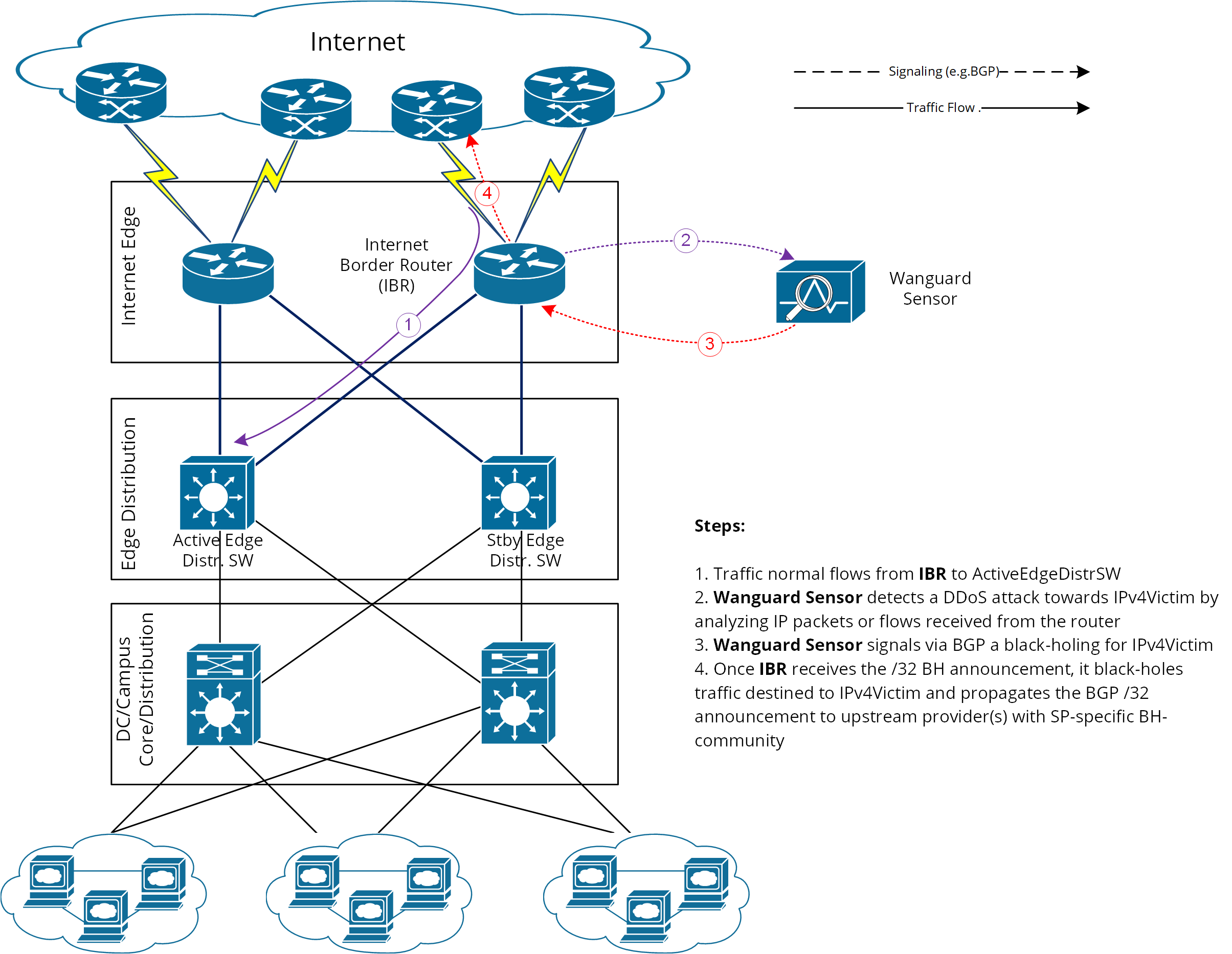
In this setup, Wanguard Sensor is the “Trigger”. After detecting an attack, it uses BGP to signal the IBR (Internet Border Router) to drop all traffic for IPv4-Victim:
● Wanguard Sensor advertises the prefix IPv4-Victim/32 with a special blackhole community● The IBR installs IPv4-Victim/32 in its routing table with Null0 as next-hop● The IBR then exports this route to its upstream providers (ISPs), translating the internal BH-community into one recognized by each ISP
This method of DDoS mitigation (blackhole BGP advertisement) aims to push the BH-prefix as close as possible to the traffic source. Many ISPs define a public community that, when attached, instructs their edge routers to send traffic to Null0 (blackhole). Unlike redirect announcements, these blackhole routes must be advertised upstream.
On the IBR, you’ll set up a routing-policy for the to-ISP BGP neighbor (export-direction) that rewrites your internal BH-community to the ISP’s BH-community.
Wanguard Sensor’s BGP config is similar to Wanguard Filter’s BGP config in the Quagga / FRR Installation section, except for the BGP community used to label blackhole routes. So here we’ll focus on the IBR config.
45.1.1. IBR BGP Session with Wanguard Sensor – Cisco Router BGP Configuration
r7500(config)# ip bgp-community new-format
r7500(config)# ip community-list standard <Wanguard-Sensor-community-name> permit <BH-community> → e.g., 65000:66
r7500(config)# route-map Wanguard-Sensor-in permit 10
r7500(config-route-map)# match community <Wanguard-Sensor-community-name>
r7500(config-route-map)# set local-preference 200 → ensures a higher priority than the redirect route
r7500(config-route-map)# set ip next-hop 192.168.255.255 → this target-IP must not be used on your network
r7500(config-route-map)# exit
r7500(config)# route-map Wanguard-Sensor-out deny 10
r7500(config-route-map)# exit
r7500(config)# ip route 192.168.255.255 255.255.255.255 Null0 → BH route for target-IP
r7500(config)# router bgp <Router-AS-number>
r7500(config-router)# bgp log-neighbor-changes
r7500(config-router)# neighbor <Wanguard-Sensor-IP-address> remote-as <Wanguard-Sensor-AS-number>
r7500(config-router)# neighbor <Wanguard-Sensor-IP-address> description <description>
r7500(config-router)# neighbor <Wanguard-Sensor-IP-address> soft-reconfiguration inbound
r7500(config-router)# neighbor <Wanguard-Sensor-IP-address> route-map Wanguard-Sensor-out out
r7500(config-router)# neighbor <Wanguard-Sensor-IP-address> route-map Wanguard-Sensor-in in
r7500(config-router)# no synchronization
r7500(config-router)# exit
45.1.2. BGP Session with Two ISPs – Cisco Router BGP Configuration
r7500(config)# route-map IBR-ISP1-out permit 5 → assumes that additional entries are defined and allow customer-routes
r7500(config-route-map)# match community <Wanguard-Sensor-community-name>
r7500(config-route-map)# set community <ISP1-BH-Community> → e.g.111:9999
r7500(config-route-map)# exit
r7500(config)# route-map IBR-ISP2-out permit 5 → assumes that additional entries are defined and allow customer-routes
r7500(config-route-map)# match community <Wanguard-Sensor-community-name>
r7500(config-route-map)# set community <ISP2-BH-Community> → e.g.222:9999
r7500(config-route-map)# exit
r7500(config)# router bgp <Router-AS-number>
r7500(config-router)# neighbor <ISP1-IP-address> remote-as <ISP1-AS-number>
r7500(config-router)# neighbor <ISP1-IP-address> route-map IBR-ISP1-out out
r7500(config-router)# neighbor <ISP2-IP-address> remote-as <ISP2-AS-number>
r7500(config-router)# neighbor <ISP2-IP-address> route-map IBR-ISP2-out out
r7500(config-router)# no synchronization
r7500(config-router)# exit
When multiple ISPs and IBRs are present, use distinct BH communities for each IBR to localize the attack source so that not all traffic to the victim gets blackholed.
45.2. Interaction between RTBH and Traffic Diversion
When Wanguard Filter and Wanguard Sensor both use BGP advertisements, you can have:
1. Redirect route initially advertised by Wanguard Filter to the IBR2. Blackhole route advertised by Wanguard Sensor to the IBR at a later stage
In this scenario, the blackhole route must have higher priority than the redirect route. Often, this is done by using a routing policy that sets a higher local-preference (e.g., 200) for blackhole (BH) routes than for redirect routes.
Where and in which direction to apply routing policies depends on:
● The role of the router peering with Wanguard Sensor (e.g., is it the IBR, a Route Reflector, etc.?)● The type of BGP session (iBGP or eBGP)
You should assign distinct BGP communities for blackhole vs. redirect announcements, for example:
Type of BGP announcement (community) |
Route to (next-hop) |
Propagated to ISP |
Redirect (e.g., 65000:99) |
Wanguard Filter |
No |
Blackhole (e.g., 65000:66) |
Null0 |
Yes |
When the Wanguard Sensor’s peer-router is a Route-Reflector, the blackhole action must still be applied at the IBR. In other words, the sample router config (for blackhole) must be adapted to the IBR’s BGP-import policy for its session with the Route-Reflector (RR). The RR itself only propagates routes (route-signaling), not traffic.
45.3. Traffic Diversion & Forwarding
When an Out-of-line Filtering (a.k.a. Side Filtering) setup is deployed, two main operations come into play:
1) Traffic diversion – Directing victim IP traffic toward the mitigation server2) Traffic forwarding/re-injection – Sending cleaned traffic back into the network, ultimately reaching the victim IP
This approach relies on the fundamental longest prefix match routing principle, where the router picks the most specific route in its table.
BGP has been chosen as the routing protocol and injects/advertises a redirect-prefix (e.g., /32 for IPv4, /128 for IPv6) to the IBR (Internet Border Router). The IBR is the router bridging ISP traffic and the internal (customer) network.
To simplify, we will consider an IPv4-Victim. In this case, Wanguard Filter sends a BGP routing update towards the IBR for IPv4-Victim/32 with a next-hop to itself, forcing the IBR to choose the path to IPv4-Victim via Wanguard Filter. The main condition for this to work is that the redirect announcement wins the BGP best-path election and the Routing-Table Manager (RTM) selection.
Please refer to the following logical diagram describing detection-diversion-cleaning and re-injection:
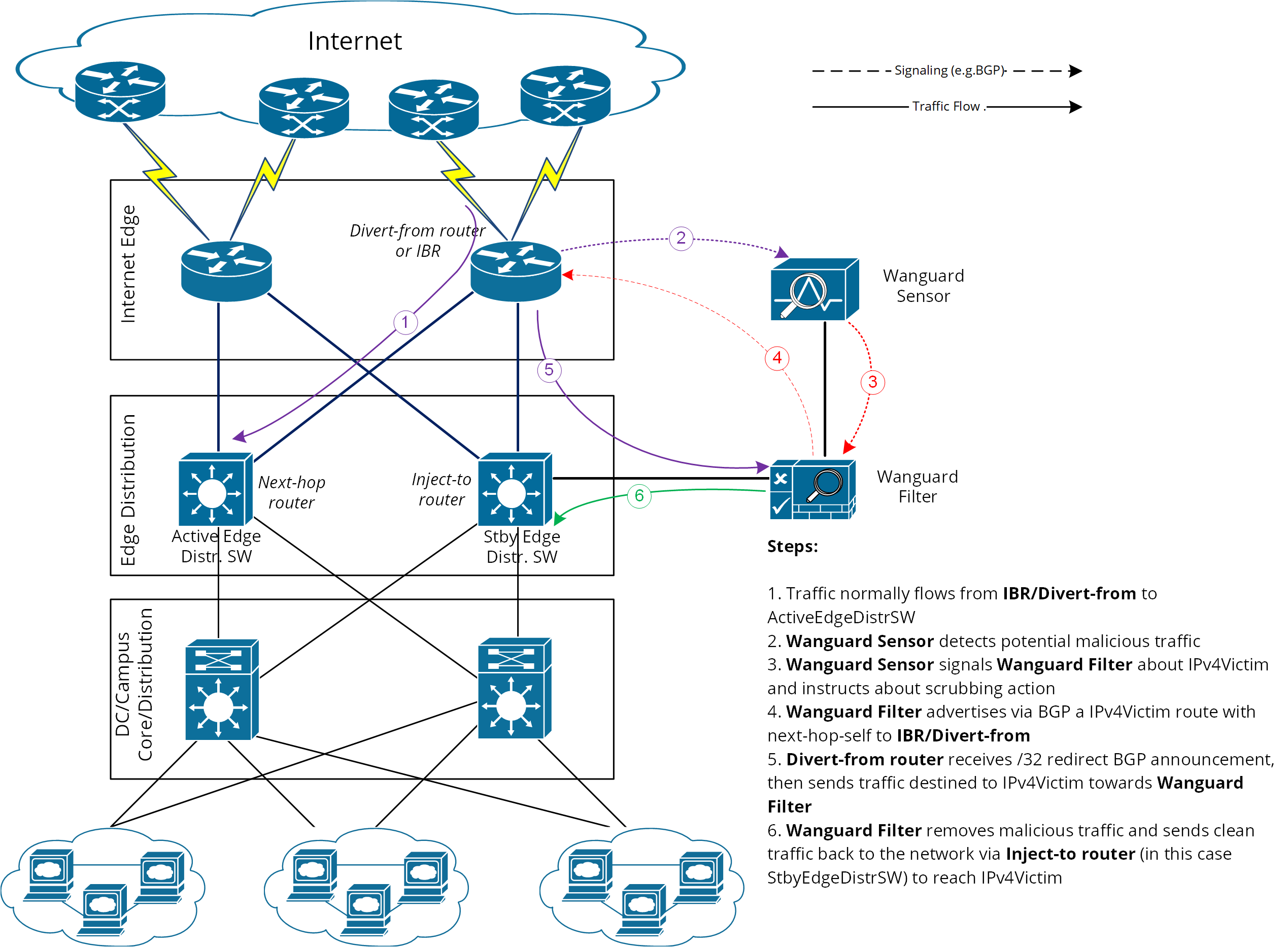
Figure-1. Logical Diagram for an Enterprise Network – how traffic diversion works
From a configuration standpoint:
1. Configure traffic-diversion using BGP as the signaling mechanism.2. Configure traffic-injection to send the cleaned traffic back onto the network so it can reach the victim IP.
45.3.1. BGP Configuration Guideline
The guideline in this section applies to any router from which Wanguard Filter diverts traffic.
To simplify, the following examples use eBGP (external BGPv4). This solution also works with iBGP, depending on your network. If using iBGP, you might need to configure next-hop-self on the session.
The steps below have to be followed:
1. Configure the Wanguard Filter’s bgpd with an easily recognizable autonomous system number. This can be a private ASN for eBGP (e.g., 64512-65534) or your own public ASN in case you are using iBGP. Bgpd sends routing information only when it diverts traffic; the route it sends then appears in the router’s routing tables. Using a recognizable value allows you to easily identify the redirect-prefixes in the router’s routing tables.2. Configure additional precautionary measures to prevent any undesirable routing behavior:a. Configure Wanguard Filter’s bgpd not to accept any prefix/advertisements from the Divert-from routerb. Configure the Divert-from router not to advertise any prefix towards Wanguard Filterc. Configure the Divert-from router to accept only redirect-prefixes from Wanguard Filter (e.g., /32 prefixes)d. Configure Wanguard Filter’s bgpd to advertise redirect-prefixes with the well-known community no-advertise – this would prevent redirect-prefixes/announcements from propagating to other peers through BGP. The no-export community might be used if the redirect-prefix has to be advertised to additional routers, or Route-Reflectors are used between Wanguard Filter’s bgpd and the Divert-from router. Both communities will prevent BGP-redirect-announcements from being advertised towards upstream providers. However, a good practice is to mark this announcement with a dedicated BGP community to distinguish between redirect and blackhole announcements.3. To ease the troubleshooting process, you may consider the soft-reconfiguration inbound command on the Divert-from router during the setup procedures.
45.3.2. Cisco Router BGP Configuration
This section describes the router’s BGP configuration used when configuring traffic diversion. The syntax of the commands is taken from the BGP configuration of a Cisco router. The following configuration steps show the commands used to configure BGP on a 72xx Cisco router:
r7200(config)# ip bgp-community new-format
r7200(config)# ip community-list standard <Wanguard-Filter-community-name> permit no-advertise
r7200(config)# ip community-list standard <Wanguard-Filter-community-name> permit <Wanguard-Filter-community>
r7200(config)# route-map Wanguard-Filter-in permit 10
r7200(config-route-map)# match community <Wanguard-Filter-community-name> exact-match
r7200(config-route-map)# exit
r7200(config)# route-map Wanguard-Filter-out deny 10
r7200(config-route-map)# exit
r7200(config)# router bgp <Router-AS-number>
r7200(config-router)# bgp log-neighbor-changes
r7200(config-router)# neighbor <Wanguard-Filter-IP-address> remote-as <Wanguard-Filter-ASn>
r7200(config-router)# neighbor <Wanguard-Filter-IP-address> description <description>
r7200(config-router)# neighbor <Wanguard-Filter-IP-address> soft-reconfiguration inbound
r7200(config-router)# neighbor <Wanguard-Filter-IP-address> route-map Wanguard-Filter-out out
r7200(config-router)# neighbor <Wanguard-Filter-IP-address> route-map Wanguard-Filter-in in
r7200(config-router)# exit
To display the router configuration, enter the show running-config command from the router global command level. In the following example, the router’s AS number is 1000 and the bgpd AS number is 64000. The following partial output is displayed:
r7200# show running-config
... skipped ...
router bgp 1000
bgp log-neighbor-changes
neighbor 192.168.1.100 remote-as 64000
neighbor 192.168.1.100 description Wanguard Filter server
neighbor 192.168.1.100 soft-reconfiguration inbound
neighbor 192.168.1.100 route-map Wanguard-Filter-out out
neighbor 192.168.1.100 route-map Wanguard-Filter-in in
no synchronization
!
ip bgp-community new-format
ip community-list standard Wanguard-Filter permit no-advertise
ip community-list standard Wanguard-Filter permit <Wanguard-Filter-community>
!
route-map Wanguard-Filter-in permit 10
      match community Wanguard-Filter exact-match
!
route-map Wanguard-Filter-out deny 10
!
... skipped ...
45.3.3. Juniper BGP Configuration
To get ExaBGP to work with Juniper to divert traffic via Flowspec, the BGP neighbor needs to accept legacy-redirect-ip-action:
junos> show configuration protocols bgp group WANGUARD neighbor X.X.X.X family inet flow
prefix-limit {
 maximum 50;
}
no-validate NO-VALIDATE;
legacy-redirect-ip-action {
 receive;
}
45.3.4. Layer 2 Forwarding Method
The following characteristics describe this option:
● Wanguard Filter, Divert-from router, and Next-hop router are on the same network or VLAN sharing the same subnet● Divert-from and Inject-to routers are two different devices● Next-hop and Inject-to routers are the same device
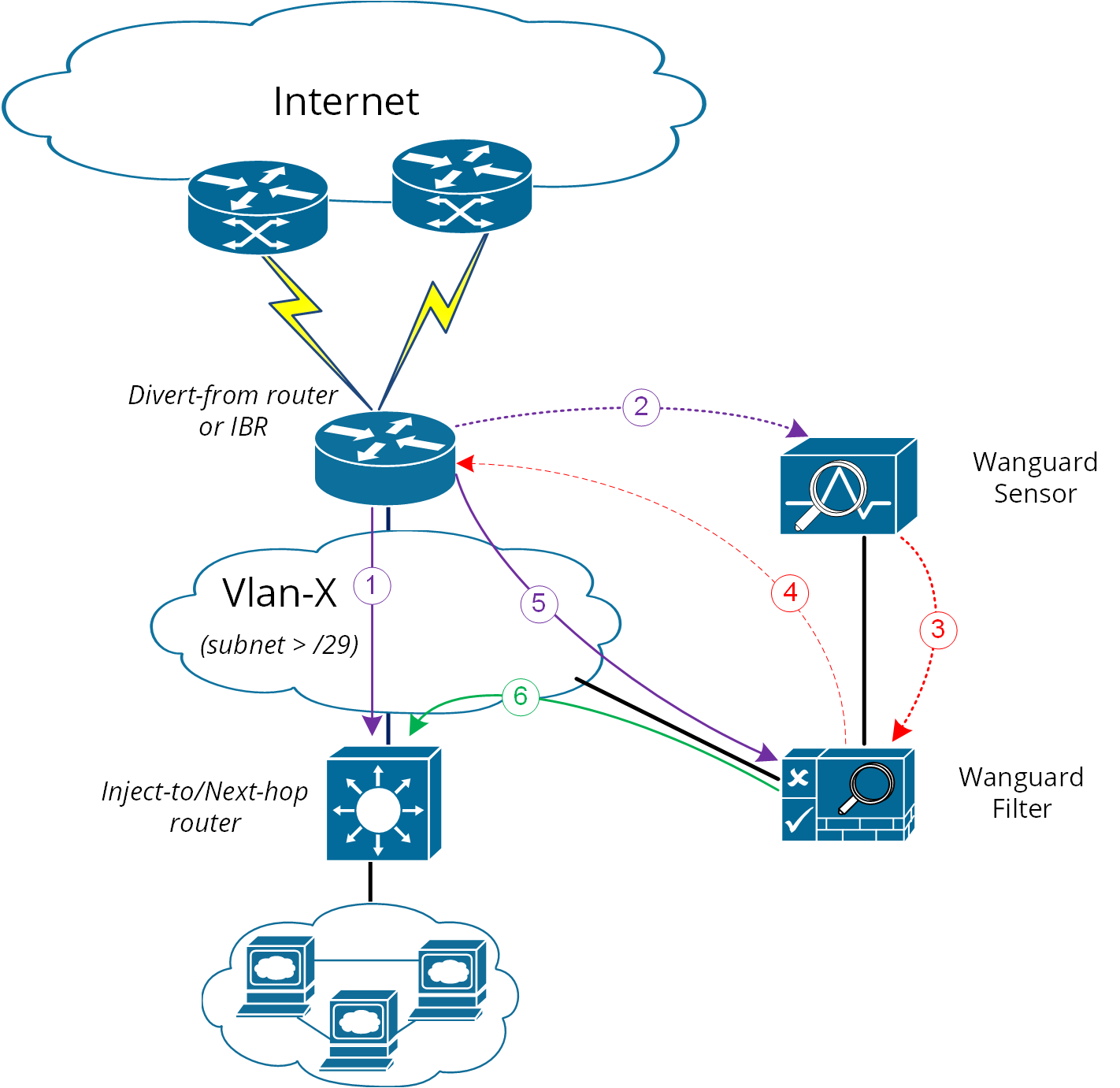
While the above solution assumes one Divert-from and one Inject-to router, a couple of variations may be considered starting from this option:
a) Multiple Divert-from routersb) Multiple Inject-to routersc) Combination of the above and/or multiple VLANs in between Divert-from and Inject-to routers
In the last scenario, the Wanguard Filter has to be connected to each VLAN and have static routes for each destination via the Inject-to/Next-hop routers.
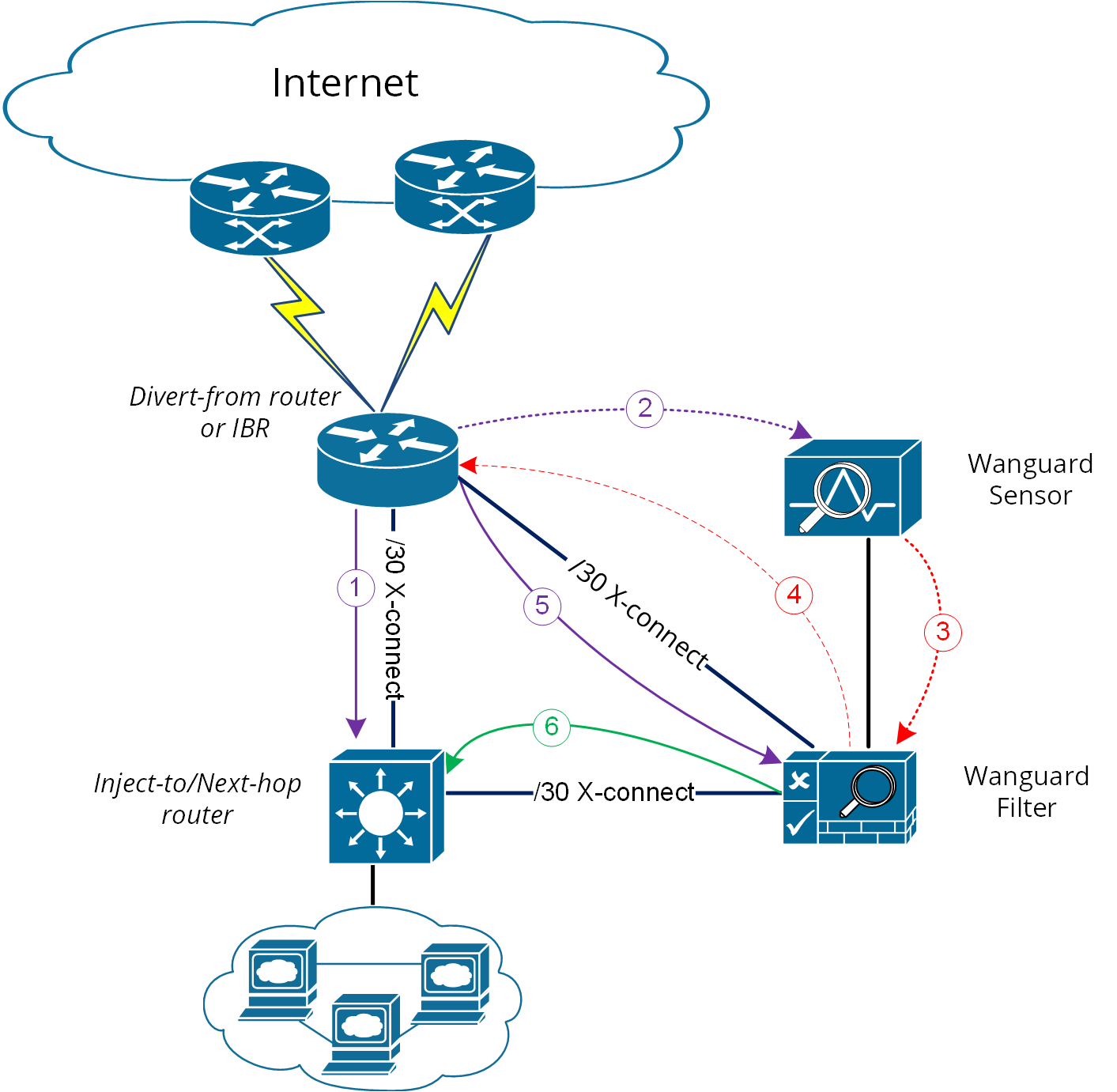
When the VLAN/LAN cannot be extended to also include Wanguard Filter, a dedicated point-to-point connection might be considered either between Wanguard Filter and the Divert-from router or between Wanguard Filter and the Inject-to/Next-hop router.
Note
Any special Layer 2 configuration on interfaces, such as bonding or VLAN-tagging, might impact the scrubbing/forwarding performance of Packet Filter. Some hardware offloads provided by the NIC might also be bypassed.
45.3.5. Layer 3 Forwarding Method
The following characteristics describe this option:
1. Divert-from and Inject-to routers are the same device – referred to in this case as “the router”2. Depending on the Next-hop router’s role, we may have the following sub-options:a) Next-hop router is on a dedicated device but is not directly connected to Wanguard Filterb) Next-hop router is on the same device as Divert-from/Inject-to routers
In scenario 2a, a routing loop issue may occur between the Divert-from/Inject-to router and Wanguard Filter:
● Wanguard Filter sends a BGP redirect announcement to the Divert-from router (e.g., a /32 prefix route)● The Divert-from router will send all traffic for that Victim-IP to Wanguard Filter● Wanguard Filter cleans the traffic and returns the cleaned traffic to the same router – Inject-to/Divert-from● The Inject-to router has the redirect route /32 in its routing table and will send back the clean-traffic towards Wanguard Filter, resulting in a routing loop
There are a couple of solutions to overcome this issue (these are suggestions, and the best solution shall not be limited to these):
1. Using GRE (Generic Routing Encapsulation) or any L3-tunneling between Wanguard Filter and the Next-hop router – in this case, the routing loop is avoided by pushing clean traffic over the GRE-tunnel to the Next-hop router through the Divert-from/Inject-to router, bypassing in this way the /32 diversion-route from Divert-from/Inject-to:
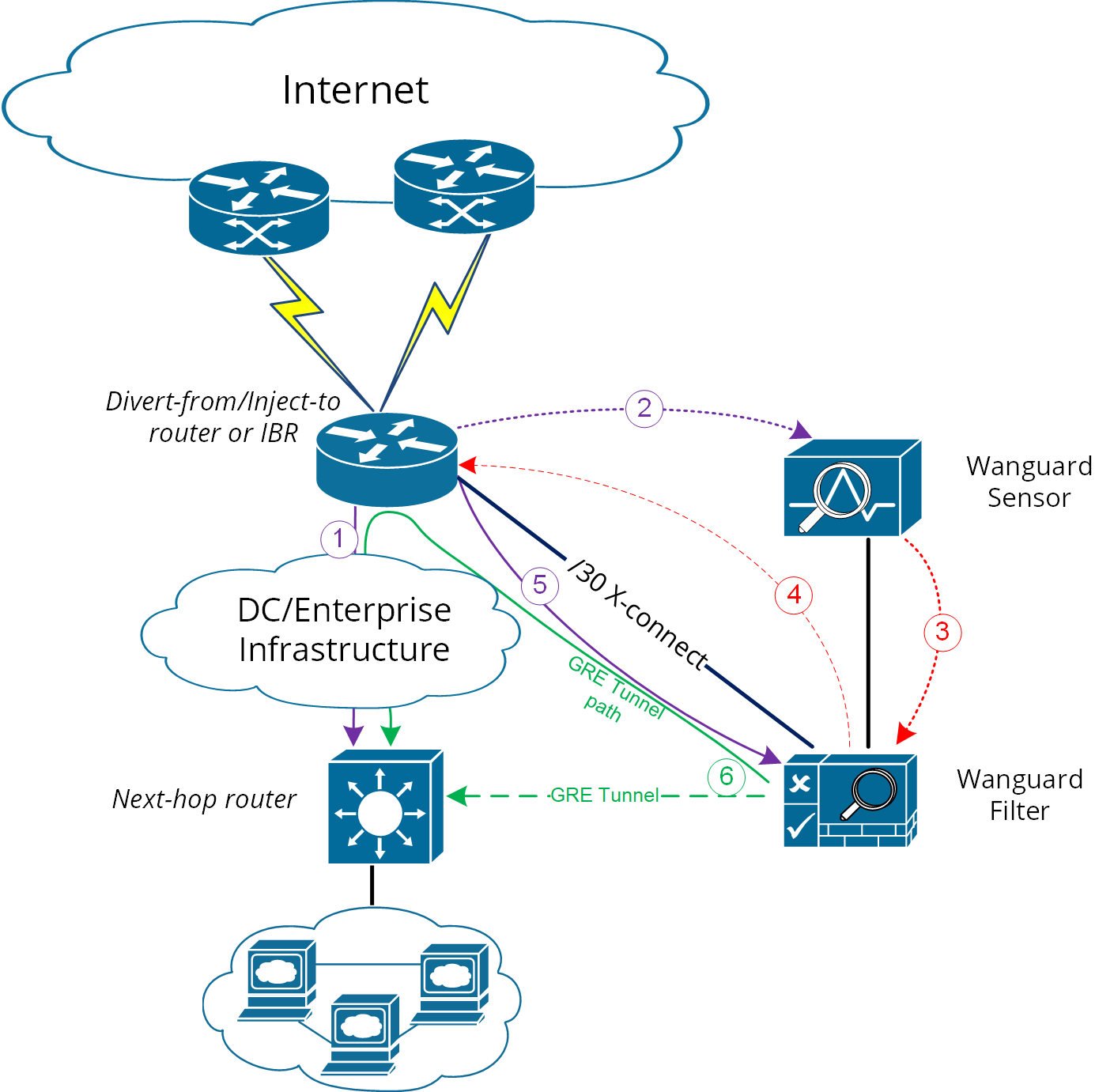
2. Using PBR (Policy-Based Routing) to override the normal routing decision from the Divert-from/Inject-to router:
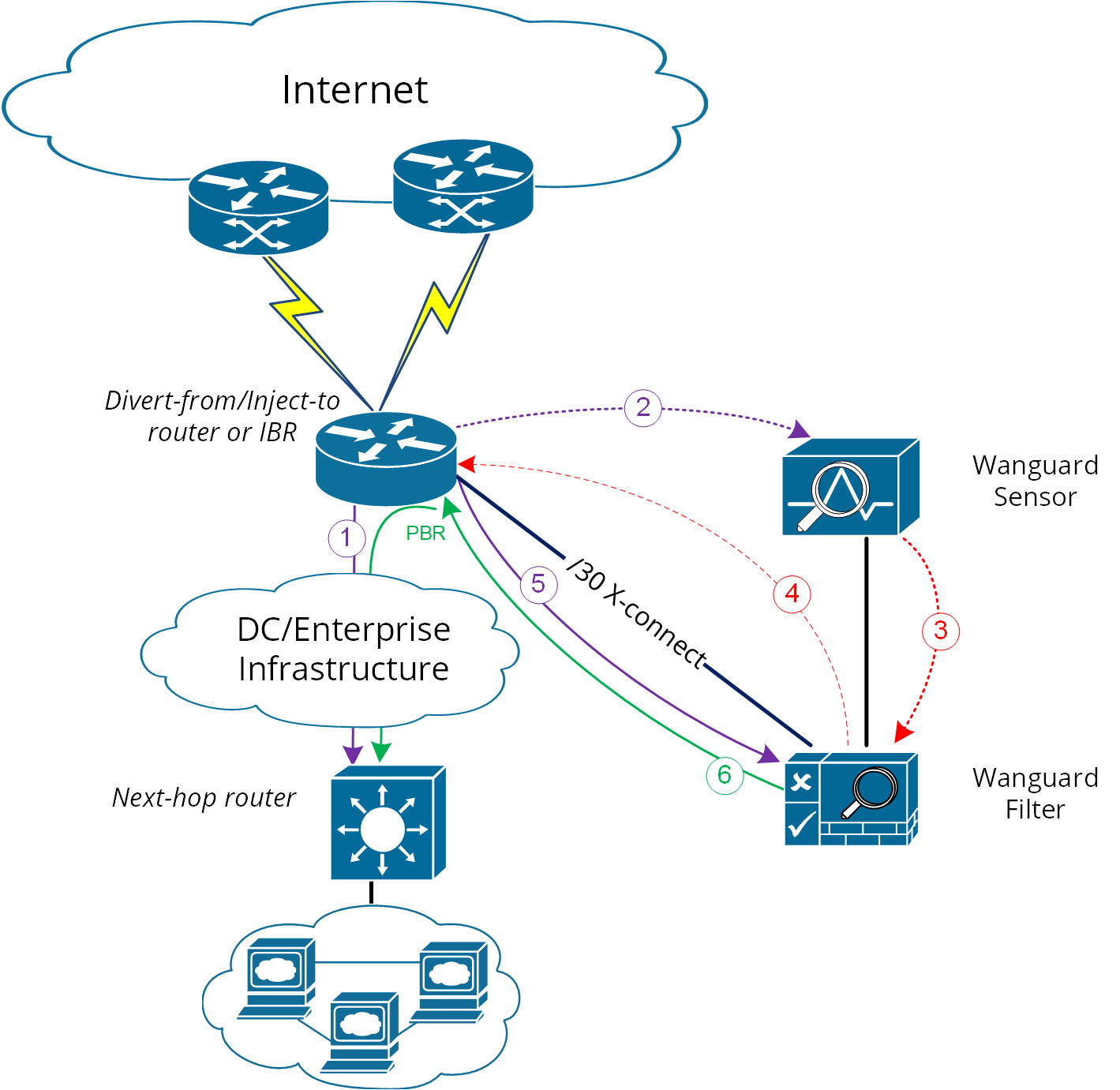
Warning
PBR may impact router performance! Depending on platform type, some optimizations may exist, but by default PBR relies on packet-by-packet processing (process switching), which has a significant impact on the router’s CPU.
If multiple Next-hop routers exist, the following have to be considered too:
● Multiple GRE tunnels have to be deployed, and static routes at Wanguard Filter level have to be considered, or● Multiple entries on PBR matching each zone, depending on which option is chosen
Please refer to the below router configuration samples for both GRE and PBR options:
1. The GRE method (using Cisco CLI) – configuration from the Next-hop router:r7200(config)# interface Tunnel 1 r7200(config-if)# ip address <X.X.X.X> 255.255.255.252 r7200(config-if)# ip mtu 1476 r7200(config-if)# ip tcp adjust-mss 1436 r7200(config-if)# tunnel source <Y.Y.Y.Y> → where Y.Y.Y.Y is the IP from Next-hop router r7200(config-if)# tunnel destination <Z.Z.Z.Z> → where Z.Z.Z.Z is the IP from Wanguard FilterNotes:• source IP and destination IP have to be reachable• default tunneling encapsulation is GRE• routing of tunnel-destination must be assured (e.g., using static routes)• Filter will have X.X.X.X-1 IP on its Tunnel interface• If the transport between Wanguard Filter and the Next-hop router supports jumbo frames, then adjust MTUs accordingly in order to avoid additional packet fragmentation and the resulting performance degradation2. The PBR method (using Cisco CLI):r7200(config)#ip access-list extended Wanguard-Filter-IPScope r7200(config-ext-nacl)#permit ip any A.A.A.A W.W.W.W → where A.A.A.A W.W.W.W is a protected prefix and its wildcard mask; multiple entries may exist r7200(config-ext-nacl)#exit r7200(config)#route-map Wanguard-Filter-PBR permit 10 r7200(config-route-map)# match ip address Wanguard-Filter-IPScope r7200(config-route-map)# set ip next-hop <C.C.C.C> → where C.C.C.C is the IP of the Next-hop router directly connected to Divert-from router r7200(config-route-map)#exit r7200(config)#interface GigabitEthernet 0/0 r7200(config-if)#ip policy route-map Wanguard-Filter-PBR r7200(config-if)#exit r7200(config)#
In scenario 2b, when only one device has all three roles (Divert-from, Inject-to, and Next-hop), neither of the above options can be considered. PBR might be considered if a “set interface” configuration may take traffic and put it on the right Layer 2 path to its destination; since this depends on the type of platform used for routing, this would have limited applicability and will not be treated further.
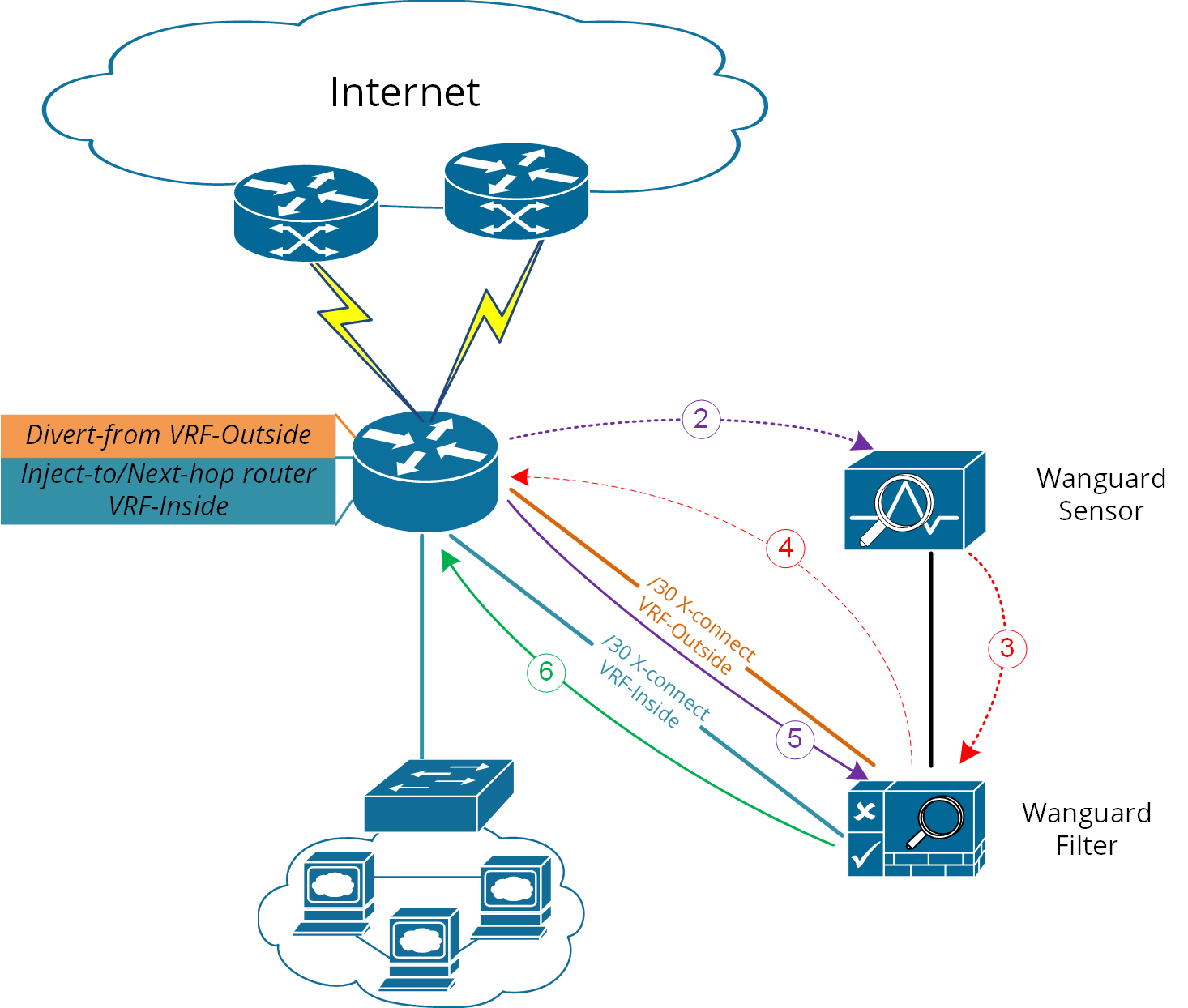
For scenario 2b, a more elaborate solution has to be considered. The main idea is to virtually separate the routing domains used by the Divert-from and Inject-to/Next-hop routers – falling back in this way on the Layer 2 Forwarding Method:
● Use VRF-Lite by defining two VRFs:• one for “outside” where the Divert-from router is (and also its BGP peering with upstream providers and Wanguard Filter)• and another one for “inside” where the Inject-to/Next-hop router is● Wanguard Filter must have two Layer 3 interfaces/sub-interfaces:• one in VRF-outside• one in VRF-inside● As in the Layer 2 Forwarding Method, static routes have to be defined on Wanguard Filter towards the destination subnets● In order to ensure normal routing between these two VRFs, MP-BGP has to be activated on “the router”; no MP-BGP neighbor has to be defined● In the VRF definitions, special policies for import/export Route-Targets (RT) have to be defined in the following manner:• e.g., mark outside routes with RT 65000:100 and inside routes with RT 65000:200• on VRF-outside:◦ Import the routes having outside-RT (e.g., 65000:100) and also inside-RT (e.g., 65000:200)◦ Export routes with outside-RT – except the redirect/diversion routes• on VRF-inside:◦ Import the routes having inside-RT and specific routes having outside-RT: the default route and/or all other outside routes except the diversion routes learned from Filter◦ Export routes with inside-RT
In this way, the inside routing table will not know about the /32 redirect prefix and will forward/route traffic normally.
For a better understanding, please refer to Figure-6 and the configuration on “router” using Cisco-CLI as an example:
r7200(config)#route-map VRF-Inside-Import deny 10
r7200(config-route-map)#match community Wanguard-Filter → The Wanguard-Filter community list has already been configured above; this will deny redirect-routes
r7200(config-route-map)#exit
r7200(config)#route-map VRF-Inside-Import permit 20 → This will allow any other routes
r7200(config-route-map)#exit
r7200(config)#
r7200(config)#ip vrf Outside
r7200(config-vrf)#rd 65000:100
r7200(config-vrf)#route-target import 65000:100
r7200(config-vrf)#route-target import 65000:200
r7200(config-vrf)#route-target export 65000:100
r7200(config-vrf)#exit
r7200(config)#
r7200(config)#ip vrf Inside
r7200(config-vrf)#rd 65000:200
r7200(config-vrf)#route-target import 65000:100
r7200(config-vrf)#route-target import 65000:200
r7200(config-vrf)#import map VRF-Inside-Import
r7200(config-vrf)#route-target export 65000:200
r7200(config-vrf)#exit
r7200(config)#
r7200(config)# interface Loopback0 → This is needed to have a BGP router-id (any existing Loopback from global can be reused)
r7200(config-if)# ip address <Z.Z.Z.Z/32>
r7200(config-if)#no shut
r7200(config-if)#exit
r7200(config)#
r7200(config)# interface <to Upstream Provider>
r7200(config-if)#ip vrf forwarding Outside → Warning! This will remove IP address from interface/IP-address has to be reconfigured again
r7200(config-if)#exit
r7200(config)#
r7200(config)# interface <to Filter off-ramp interface>
r7200(config-if)#ip vrf forwarding Outside → Warning! This will remove IP address from interface/IP-address has to be reconfigured again
r7200(config-if)#exit
r7200(config)#
r7200(config)# interface <to Filter on-ramp interface>
r7200(config-if)#ip vrf forwarding Inside → Warning! This will remove IP address from interface/IP-address has to be reconfigured again
r7200(config-if)#exit
r7200(config)#
r7200(config)# interface <to Inject-to/Next-hop>
r7200(config-if)#ip vrf forwarding Inside → Warning! This will remove IP address from interface/IP-address has to be reconfigured again
r7200(config-if)#exit
r7200(config)#
r7200(config)#router bgp 65000 → You may use your ASN instead of 65000
r7200(config-router)# no synchronization
r7200(config-router)#bgp log-neighbor-changes
r7200(config-router)#no auto-summary
r7200(config-router)#address-family vpnv4
r7200(config-router-af)# no synchronization
r7200(config-router-af)#exit-address-family
r7200(config-router)# address-family ipv4 vrf Inside
r7200(config-router-af)# no synchronization
r7200(config-router-af)# redistribute connected
r7200(config-router-af)# redistribute <other IGP/static if needed>
r7200(config-router-af)#exit-address-family
r7200(config-router)# address-family ipv4 vrf Outside
r7200(config-router-af)# no synchronization
r7200(config-router-af)# redistribute connected
r7200(config-router-af)# redistribute <other IGP/static if needed>
r7200(config-router-af)#exit-address-family
r7200(config-router)#exit
r7200(config)#